


7 WhatsApp helpdesk tools: What actually matters
Explore 7 WhatsApp helpdesk tools and compare their ticketing, automation, agent assignment, SLA tracking, AI, escalation, and reporting capabilities. Learn when your business needs a WhatsApp helpdesk and what features matter when choosing a platform.

A WhatsApp helpdesk is a support system that turns incoming WhatsApp support requests into structured, trackable work that teams can assign, respond to, monitor, and resolve. Unlike a basic WhatsApp inbox, a helpdesk gives support teams tools for ticket management, agent assignment, automation, SLA tracking, escalation, and performance reporting.
The need for structured WhatsApp support is becoming more important as business messaging grows. In June 2026, Meta reported that more than 1 billion active threads with businesses take place across WhatsApp, Messenger, and Instagram every day.
When choosing a WhatsApp helpdesk, what matters is whether the software helps your team manage support requests efficiently, maintain accountability, reduce manual work, and give managers visibility into support performance.
When does your business need a WhatsApp helpdesk?
A WhatsApp helpdesk becomes useful when support requests are too frequent, too distributed, or too important to manage from a basic WhatsApp inbox. If several agents handle requests, customers wait for replies, or managers cannot see which issues are still open, a helpdesk can bring structure to the process.
You may need a WhatsApp helpdesk when:
1. Your support requests are increasing
A growing number of WhatsApp requests is a positive sign for your business, but handling them manually can become difficult as volume increases. Meta reported that 73.3% of consumers across 22 global markets prefer messaging when communicating with a business, showing how important messaging has become as a business support channel.
Example: An online retailer receives 30 WhatsApp requests a day during normal weeks but 150- 200 during a sale. When agents use one inbox without a structured workflow, urgent delivery issues can get buried under routine questions about prices or product availability.
A helpdesk can turn these requests into organised work so agents can focus on what needs attention first.
2. Multiple agents are handling the same WhatsApp number
When a business moves from one support agent to a team, simply sharing access to WhatsApp may no longer be enough. Agents need to know which requests are already being handled and which ones still need attention.
Example: A travel company has five support agents answering booking and cancellation requests. Without clear assignment, two agents may respond to the same customer while another request remains unanswered.
A WhatsApp helpdesk can provide a central workspace where requests can be assigned to the right agent instead of relying on manual coordination.
3. Support requests are being missed or answered late
A busy inbox can make it difficult to identify requests that have been waiting too long. This becomes especially important when customers contact a business outside normal working hours or when support volume suddenly increases.
Example: A customer sends a message at 8 p.m. about a failed payment. The next morning, several newer requests have arrived, pushing the payment issue further down the inbox. Without a way to track pending requests, the customer may have to follow up again.
A helpdesk gives teams a clearer way to identify pending requests and maintain response timelines.
4. Your team needs to prioritise urgent requests
Not every support request requires the same level of attention. A product question, delivery delay, payment failure, and service complaint may all arrive through the same WhatsApp number but require different handling.
Example: A customer reports that an order has been charged twice. At the same time, several other customers are asking for product information. Treating every request in exactly the same way can make it harder for agents to address urgent cases quickly.
A structured helpdesk can help teams organise requests according to priority, workload, or other rules defined by the business.
5. Managers cannot easily track support performance
If managers have to ask individual agents for updates, it becomes difficult to understand the overall support workload. They may not know how many requests are open, how long customers have been waiting, or where delays are happening.
Example: A support manager notices that customers are complaining about slow responses but cannot identify whether the problem is high request volume, uneven agent workloads, or delayed escalation.
A helpdesk can provide a central view of support activity, helping managers identify bottlenecks and review team performance.
6. Your business needs response and resolution targets
As support operations become more structured, businesses may need defined targets for responding to and resolving requests. This is particularly relevant for companies handling service-related issues, technical problems, or time-sensitive requests.
Example: A SaaS company wants every high-priority support request acknowledged within one hour and resolved within a defined timeframe. Tracking this manually across WhatsApp messages makes it difficult to identify requests approaching or exceeding those limits.
A helpdesk with SLA tracking and escalation can make these targets easier to monitor.
7. Your agents spend too much time answering repetitive questions
Some support teams repeatedly answer the same questions about delivery times, returns, account setup, pricing, or service availability. Handling every basic query manually can take time away from more complex requests.
WhatsApp itself is increasingly supporting automated business assistance. In 2026, Meta introduced Business AI on WhatsApp for eligible small businesses in India, allowing businesses to answer common questions and provide information about products and services.
Example: An education company receives dozens of WhatsApp questions every day about course timings, fees, and enrollment steps. Instead of requiring an agent to answer every basic question from scratch, automation can handle routine queries while agents focus on requests that require human assistance.
8. Your support process has outgrown a simple WhatsApp inbox
The clearest sign is often operational rather than numerical. If your team has started using spreadsheets, manual reminders, separate notes, or internal messages just to remember who is handling which support request, the process may need a dedicated helpdesk.
Example: An appliance service company uses WhatsApp for repair requests. One employee maintains a spreadsheet of pending cases, another checks which technician is available, and the support team manually follows up on unresolved issues. As request volume grows, maintaining these separate processes becomes harder.
A WhatsApp helpdesk can bring request tracking, assignment, follow-ups, escalation, and reporting into one workflow.
How does a WhatsApp helpdesk improve support operations?
A WhatsApp helpdesk improves support operations by turning incoming WhatsApp support requests into a structured workflow. Instead of relying on a busy inbox, agents can work from an organised process where requests can be assigned, prioritised, monitored, escalated, and resolved.
Here is how that changes day-to-day support operations:
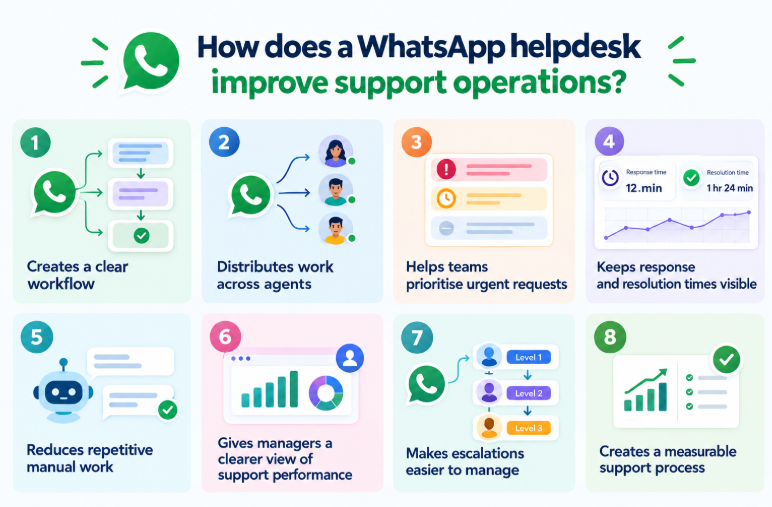
1. Creates a clear workflow for every support request
A helpdesk provides teams with a structured approach to assist with incoming requests. An initial request will move through assignment, response, escalation, resolution and closure without relying on complete manual follow-up.
Example: A customer reports a failed payment through WhatsApp. Rather than leaving the message in a general inbox, the support team can track it as a request, assign it to the appropriate agent, monitor its progress, and record the resolution.
This makes it easier for agents to understand what needs attention and for managers to see which requests are still open.
2. Distribute work across available agents
If multiple agents are providing support services for the same WhatsApp channel, assigning the query to a particular agent may become a daily challenge. This manual coordination can be minimised through automated assignment rules.
For example, round-robin assignment can distribute incoming support requests across available agents instead of allowing every new request to remain in a shared queue. This can help create clearer ownership and reduce the chance of requests being overlooked.
The exact assignment rules can vary by helpdesk. Some systems may also consider agent availability, workload, capacity, or request priority.
3. Helps teams prioritise urgent requests
Not every support request has the same urgency. A question about product information may not need the same attention as a payment failure, service disruption, or time-sensitive complaint.
A structured helpdesk allows teams to organise requests based on factors such as priority, status, or other business rules.
Example: If a customer reports that they were charged twice for the same order, the support team can identify the request as requiring immediate attention instead of treating it like a routine product question.
This helps agents spend their time where it matters most.
4. Keeps response and resolution times visible
If you have many texts in your WhatsApp messages waiting, it will be hard to determine how long a text message has been standing in line. A helpdesk can introduce response and resolution targets, so teams have a clearer view of pending work.
For example, a business may set a target for responding to high-priority support requests within one hour and resolving them within a defined period. The team can then monitor requests against those targets instead of relying on memory or manual reminders.
If a request approaches or exceeds its defined limit, an escalation workflow can alert the appropriate person or team.
5. Reduces repetitive manual work
Support agents are frequently required to deal with the same issues and questions, consuming some of their time on a daily basis. Automation can reduce the amount of manual work involved in these processes.
Example: An education company may receive repeated WhatsApp questions about course schedules, fees, or enrollment steps. An automated response or AI assistant can handle straightforward questions, while agents can take over when a request requires a more specific response.
This allows the support team to spend more time on complex or sensitive requests instead of repeatedly answering the same basic questions.
6. Gives managers a clearer view of support performance
Without centralised tracking, managers may have to depend on individual agents for updates. A helpdesk can bring support activity into a common view, making it easier to monitor workload, pending requests, response times, and unresolved issues.
Example: If one agent consistently has a larger number of open requests than the rest of the team, a manager can identify the imbalance and take action rather than discovering the issue only after customers start following up.
Reports and dashboards can also help teams identify recurring bottlenecks and review support performance over time.
7. Makes escalations easier to manage
Some support requests cannot be resolved by the first agent who receives them. They might require a manager, technical team, billing team or other department.
A helpdesk can provide an escalation path for these situations instead of requiring agents to coordinate everything manually.
Example: An agent receives a payment-related request that requires approval from the finance team. Instead of keeping the request in a personal note or remembering to follow up later, the support workflow can flag or escalate it to the appropriate team.
This creates greater visibility around requests that need additional attention.
8. Creates a measurable support process
The largest change in operation is that support is easier to measure. Teams can have a broader conversation about WhatsApp beyond just seeing the number of messages and begin the conversation to see how the full support process played out – how many requests were received, how long it took for them to be assigned, and for how long the request remained open, and how often it was escalated and how many were resolved.
Such information may be useful to managers in deciding how the support process is working and where it might need modification.
In simple terms, a WhatsApp helpdesk changes support from “someone needs to reply to this message” into a trackable process with clear ownership, priorities, timelines, and outcomes.
Top 7 WhatsApp helpdesk tools
So below are the seven WhatsApp helpdesk tools worth considering. For each one, we’ll look at what it offers for support teams and the type of workflow it can help manage. This can make it easier to see which platform matches your team’s day-to-day support needs.
1. Pepper Cloud
Pepper Cloud is an AI-powered WhatsApp CRM that turns incoming WhatsApp support requests into trackable support tickets. It gives support and sales teams one place to manage tickets, assign work, track response times, and monitor support activity through a WhatsApp Business number.
For teams managing a growing volume of support requests, its key capabilities include:
- AI chatbots and automation: AI chatbots can answer common questions 24/7 using information from your business knowledge base. This helps agents spend less time answering repeated questions, and it can also reduce the workload on support agents by up to 50%, allowing them to focus on requests that need human attention.
- Automated ticket assignment: Round-robin routing distributes incoming support tickets across the team, while automated flows can consider real-time agent availability and skill sets when assigning requests. This helps teams maintain a more balanced workload and reduces manual ticket allocation.
- SLA tracking and escalation: Teams can set targets for how quickly a ticket should receive its first response and how long it should take to resolve. If a ticket goes beyond the set time, it can be automatically escalated through the defined management process.
- Jira integration for technical issues: When a support request needs help from a technical or development team, agents can turn the ticket into a Jira task with one click. This helps the support and technical teams work on the same issue without handling it as two separate requests.
- Support performance dashboards: Real-time dashboards provide visibility into agent efficiency, SLA compliance, and recurring ticket trends. Managers can use these insights to identify operational issues and make changes based on actual support data.
Use case: Imagine a software company receiving many support requests through WhatsApp. The AI chatbot can handle common questions, while more complex tickets can be assigned to available agents. If an agent finds a technical problem, they can create a Jira task from the support ticket. Managers can then use the dashboard to check response times, SLA performance, and ticket trends.
This makes Pepper Cloud particularly relevant for teams that want to move from manually managing WhatsApp requests to a more structured support-ticket workflow.
2. Wati
Wati is a WhatsApp-focused business messaging platform that combines a shared team inbox with automation, routing and AI capabilities.
Its support-related capabilities include:
- Shared team inbox: Agents can manage WhatsApp messages from a central workspace instead of sharing access to the same WhatsApp account.
- Ticket assignment: Requests can be assigned to individual team members, helping establish ownership.
- Routing and automation: Businesses can create rules to direct incoming requests to the appropriate team or agent.
- AI support: Wati provides AI capabilities for handling common support requests and assisting agents.
- Analytics: Teams can track response times, resolution rates and agent performance.
- Internal collaboration: Agents can use internal notes and conversation history to maintain context while handling requests.
Wati's current documentation describes AI support agents, advanced routing, shared team inbox functionality, internal notes, conversation history and support analytics.
3. respond.io
respond.io is a customer messaging platform designed for businesses managing conversations across multiple channels. WhatsApp can be connected alongside channels such as Instagram, Facebook Messenger, Telegram, email and live chat.
Its main support capabilities include:
- Omnichannel inbox: Teams can manage messages from different channels in one workspace.
- AI agents: AI agents can answer common questions, perform actions and hand off requests to human agents when needed.
- Workflow automation: Workflows can automate routing, assignment, follow-ups and other support processes.
- Routing and assignment: Incoming WhatsApp requests can be directed to the appropriate team or agent.
- CRM integration: WhatsApp activity can be connected with CRM workflows and customer information.
- Reporting: Teams can monitor messaging and operational activity across their channels.
4. Trengo
Trengo combines WhatsApp with other business communication channels through a shared inbox. Its WhatsApp integration is designed for teams that want to manage messages collaboratively rather than giving each agent separate access.
Key capabilities include:
- Shared WhatsApp inbox: Agents can manage WhatsApp messages from one central workspace.
- Team assignment: Incoming requests can be assigned to specific team members.
- AI assistance: AI can help automate responses and support workflows.
- Automation: Teams can create workflows for repetitive support and communication tasks.
- Omnichannel support: WhatsApp can be managed alongside other communication channels.
- WhatsApp coexistence: Trengo supports a setup where businesses can use the WhatsApp Business App and Trengo's API-based workflows with the same number, subject to the applicable configuration and limitations.
Trengo currently highlights shared inbox management, AI-powered responses and automation for WhatsApp. Its documentation also describes WhatsApp Coexistence with the Business App.
5. Interakt
Interakt is a WhatsApp-focused business communication platform that combines support, engagement and sales capabilities.
For support teams, relevant capabilities include:
- Shared team inbox: Multiple agents can manage WhatsApp requests from a central workspace.
- Assignment and routing: Requests can be assigned or reassigned to appropriate team members.
- Automated replies: Quick replies and automation can reduce repetitive manual responses.
- AI assistance: AI-powered features can help answer routine questions.
- Customer information: Agents can access customer details while handling requests.
- Analytics: Support teams can use response and resolution information to understand operational performance.
6. Zendesk
Zendesk approaches WhatsApp as part of a broader customer-service platform. Businesses can connect WhatsApp to the Zendesk Agent Workspace and manage it alongside other support channels.
Key capabilities include:
- WhatsApp in Agent Workspace: Agents can manage WhatsApp messages within the Zendesk support environment.
- AI agents: Zendesk AI agents can be connected to WhatsApp to provide automated support.
- Agent assistance: AI capabilities can assist human agents with support tasks.
- Helpdesk workflows: WhatsApp can operate as one channel within Zendesk's broader ticketing and service-management environment.
- Omnichannel support: Businesses can manage WhatsApp together with other customer-service channels.
- Proactive messaging: WhatsApp Business Platform workflows can use approved message templates for applicable outbound communication.
Zendesk's current documentation confirms that WhatsApp can be connected to its Agent Workspace and that AI agents can be deployed on WhatsApp.
7. Freshdesk
Freshdesk brings WhatsApp into a traditional helpdesk and ticketing environment. Incoming WhatsApp interactions can be converted into tickets, allowing agents to manage them using standard helpdesk workflows.
Key capabilities include:
- Automatic ticket creation: WhatsApp interactions can automatically create tickets in Freshdesk.
- Ticket management: Agents can reply, add notes, change ticket status and perform other ticket actions from the helpdesk.
- SLA policies: Teams can define response and resolution targets specifically for WhatsApp tickets.
- Automation: Rules can route WhatsApp tickets to appropriate agents or teams.
- AI assistance: Freshdesk supports AI capabilities for helping agents and resolving support requests.
- Reporting: Teams can monitor ticket volume, resolution times, SLA performance and other support metrics.
- Omnichannel inbox: WhatsApp can be managed alongside email, chat, social channels and other support sources.
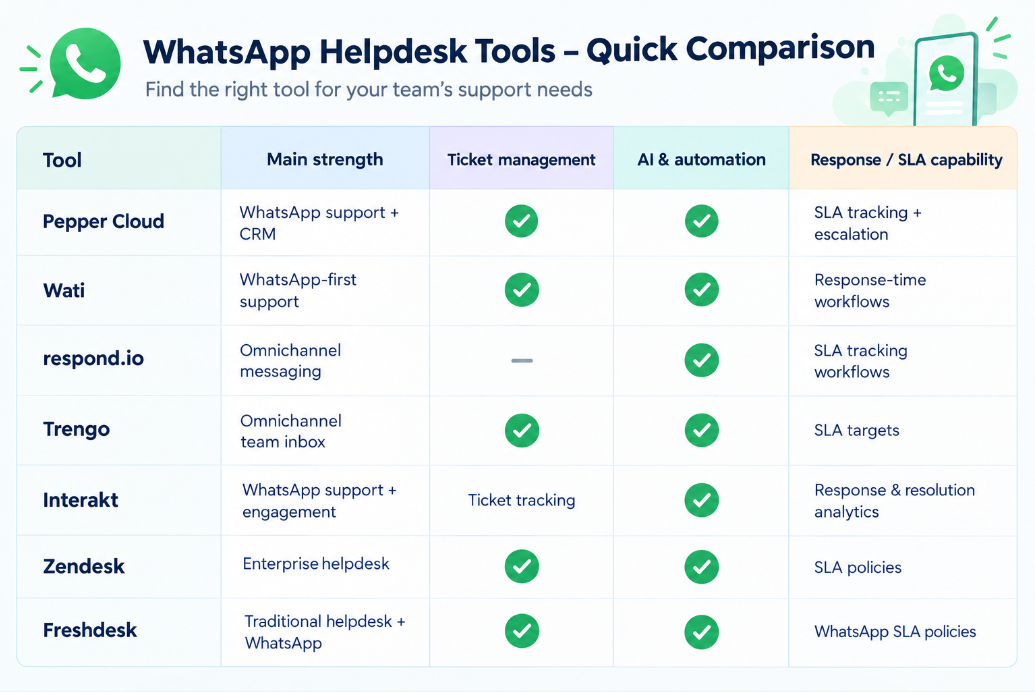
WhatsApp helpdesk tools comparison: Features, ticketing & SLA capabilities
Here’s a clear comparison of WhatsApp helpdesk tools, covering the key features, ticket management, SLA capability, and automation
Conclusion
A WhatsApp helpdesk is useful when WhatsApp support requests have become too complex to manage through a basic inbox. The right platform should give your team a structured way to capture, assign, prioritise, respond to, escalate, and resolve support requests.
The seven tools covered here take different approaches. Some are built around WhatsApp-first engagement, while others extend established helpdesk or customer-service platforms into WhatsApp.
For businesses looking to combine WhatsApp support requests with ticketing, AI, automatic assignment, SLA tracking, escalation, reporting, and CRM capabilities, Pepper Cloud offers these functions within its AI-powered WhatsApp CRM.
Frequently asked questions
1. What is a WhatsApp helpdesk?
Ans: A WhatsApp helpdesk is software that helps businesses manage WhatsApp support requests through features such as ticketing, assignment, automation, SLA tracking, escalation, and reporting.
2. When does a business need a WhatsApp helpdesk?
Ans: A business may need a WhatsApp helpdesk when support request volume increases, multiple agents share one WhatsApp number, requests are being missed, or managers need better control over response times and support performance.
3. What features should a WhatsApp helpdesk have?
Ans: Important capabilities include ticket management, automatic assignment, SLA tracking, escalation, AI and automation, reporting, integrations, and support for multiple agents.
4. Can multiple agents handle WhatsApp support?
Ans: Yes. WhatsApp Business Platform can be connected to helpdesk and CRM platforms that provide a shared workspace where multiple agents can manage requests from the same business number. The exact setup and capabilities vary by platform.
5. How does AI help with WhatsApp support?
Ans: AI can handle repetitive requests, provide automated answers, assist agents with responses, classify or prioritise incoming requests, and hand complex issues to human agents. Its value depends on how well it is connected to the business's support workflow and knowledge.