


AssistAI in Pepper Cloud CRM: AI reporting, automation, and customer support
Explore how AssistAI enables AI reporting in CRM, customer reply automation, activity management, and conversational CRM workflows inside Pepper Cloud CRM.

If your sales and support teams still spend hours pulling CRM reports, replying to repetitive customer queries, or manually updating records, you are not alone. Most growing businesses struggle with CRM adoption because routine tasks consume too much time.
That is where AssistAI inside Pepper Cloud CRM changes the game.
AssistAI is an intelligent AI CRM assistant built directly into Pepper Cloud CRM. It helps your teams automate CRM reporting, streamline CRM automation workflows, respond to customer queries instantly, and manage records using natural language commands.
Instead of clicking through multiple dashboards or manually searching records, your team can simply ask AssistAI questions like:
- “How many opportunities do we currently have?”
- “How many leads were converted last month?”
- “Show opportunities assigned to John.”
- “Create a follow-up task for this lead tomorrow at 10 AM.”
Within seconds, AssistAI provides answers, performs actions, and helps your team move faster.
In this blog, you will discover how AssistAI helps sales, support, and CRM users improve AI reporting, automate workflows, and deliver faster customer responses using conversational AI in CRM systems.
Why businesses need AI inside CRM systems
Modern businesses generate huge volumes of customer data every day. However, many CRM users still struggle with:
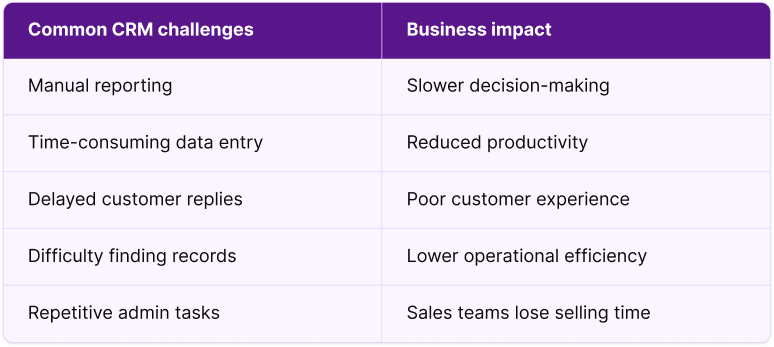
Sales and support teams often spend significant time on repetitive CRM tasks, such as reporting, data entry, record updates, and customer communication.
This is exactly why AI-powered CRM assistants are becoming essential.
AssistAI in Pepper Cloud AI CRM acts like a virtual CRM assistant for your entire organisation.
 Pepper Cloud Marketing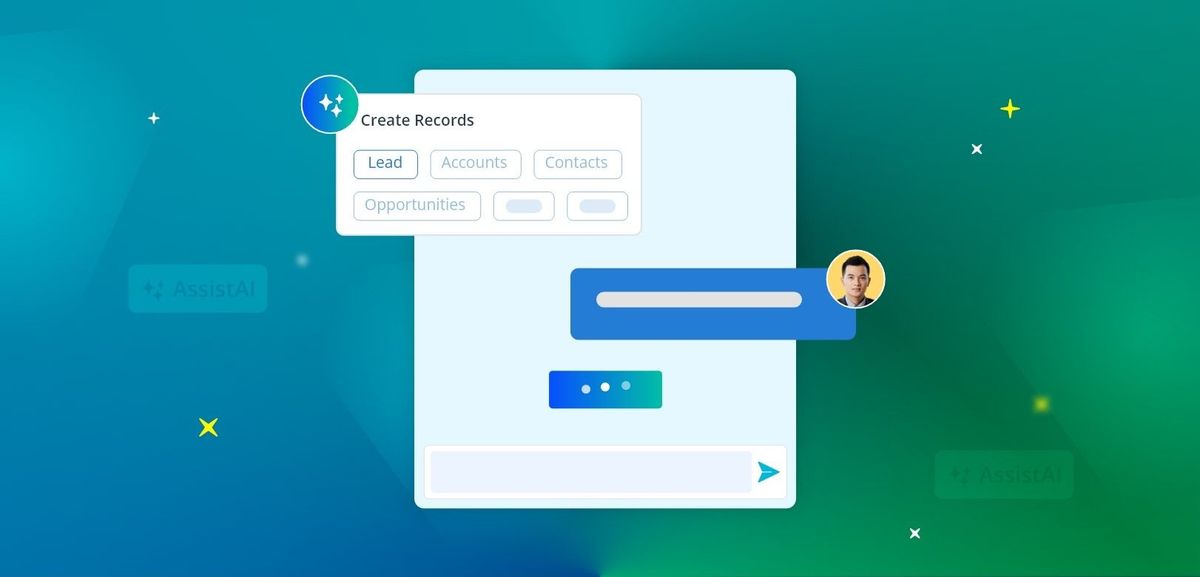
Here are a few ways you can use AssistAI for your business.
1. Simplify AI reporting with conversational AI
One of the biggest strengths of AssistAI is AI reporting.
Instead of relying on CRM administrators or manually building dashboards, your teams can access business insights through simple conversational prompts. This makes reporting more accessible for sales teams, managers, and support users who may not have technical reporting expertise.
How teams can use AI reporting
AssistAI panel helps users analyse CRM performance data in real time. Teams can use it to:
- Track quarterly revenue performance
- Identify top-performing sales representatives
- Measure team activity completion rates
- Analyse conversion trends across campaigns
- Monitor pipeline health without building manual reports
AssistAI quickly analyses CRM data and returns accurate AI-powered CRM reporting insights.
For example, a sales manager preparing for a weekly review meeting can instantly retrieve pipeline summaries, conversion updates, and activity performance without manually generating multiple reports.
Because AssistAI works directly inside Pepper Cloud CRM, users can access reporting insights faster and take action immediately from the same workspace.
This reduces reporting delays, improves visibility across teams, and helps decision-makers respond more quickly to changing business priorities.
Why AI reporting matters
Traditional reporting often creates bottlenecks because users need to:
- Understand CRM filters
- Build custom reports manually
- Create spreadsheets
- Analyse the data separately
AssistAI eliminates these extra steps.
With conversational AI reporting, anyone in your organisation can access business insights instantly. For growing businesses, this can significantly improve operational efficiency.
2. Streamline record management with natural language commands
Managing CRM records manually can quickly become frustrating for sales and support teams. Users often have to switch between multiple screens, search for records individually, fill out repetitive forms, and spend valuable time updating information instead of focusing on customers.
AssistAI simplifies CRM record management by allowing your team to use conversational commands to create, update, search, or delete records instantly. Instead of navigating multiple forms, users can complete CRM tasks faster using simple natural language instructions.
Create records instantly
Users can ask AssistAI to create: Leads, Contacts, Accounts, Opportunities using NPL commands such as: “Create a new lead named David Miller from ABC Technologies.”
AssistAI automatically asks for any required fields before creating the record.
Update CRM records easily
Users can also modify records using natural language. For example, “Update the opportunity value to $25,000.”
AssistAI validates required fields before making updates.
Search and view CRM records quickly
Instead of manually searching through the CRM, users can simply ask:
- “Show all opportunities closing this month.”
- “Find contact details for Sarah Lee.”
- “List accounts assigned to Michael.”
AssistAI retrieves the requested records instantly.
Delete records securely
AssistAI can also help remove records when necessary while ensuring proper validation and permissions.
3. Manage CRM activities with AssistAI
Imagine a sales representative finishing back-to-back client calls while also trying to update meeting notes, schedule follow-up tasks, and log activities before the next conversation begins. Important updates can easily get delayed or missed when teams are constantly switching between conversations and CRM screens.
AssistAI simplifies activity management by allowing users to create, update, and fetch activities through simple conversational commands. Instead of manually navigating multiple screens, teams can record updates instantly and keep CRM data accurate without interrupting their workflow.
Activities AssistAI can manage
- Create notes
- Schedule tasks
- Log calls
- Create events
- Fetch activity history
Example commands
- “Create a follow-up task for lead <Lead name>.”
- “Add meeting notes to this account.”
- “Show recent activities for this opportunity.”
AssistAI asks for the required activity details before saving information.
This ensures accurate CRM updates without manual navigation.
4. Access associated records instantly
Sales and support teams often need quick visibility into related customer information while handling customer conversations, follow-ups, or account reviews. However, switching between multiple CRM tabs to gather linked records can slow teams down and interrupt workflows.
AssistAI helps users instantly access associated records linked to:
- Leads
- Contacts
- Accounts
- Opportunities
For example, users can ask:
- “Show contacts linked to this account.”
- “List opportunities associated with this company.”
This gives teams better customer context during conversations, helps sales representatives prepare for follow-ups faster, and improves visibility across accounts and opportunities without manually searching through the CRM.
5. Improve team collaboration and assignments
As businesses grow, managing ownership assignments across leads, contacts, and opportunities can become increasingly difficult. Sales managers often need to manually identify available team members, reassign records, or coordinate tasks between departments. These delays can slow response times and create confusion around ownership.
AssistAI helps teams manage collaboration and assignments directly inside Pepper Cloud CRM without unnecessary back-and-forth communication.
Users can:
- View CRM users
- Resolve assignable team members
- Manage ownership assignments
For example:
“Assign this opportunity to Jessica.”
“Show available sales representatives for this region.”
Instead of manually searching through user lists or coordinating assignments over calls and messages, teams can handle ownership updates instantly through conversational commands.
This helps organisations improve internal coordination, reduce assignment delays, and maintain better visibility across sales and support operations.
6. Additional AI reporting and calculation capabilities
Beyond standard AI reporting, AssistAI also helps teams access real-time calculations and business data directly inside Pepper Cloud CRM.
For businesses managing international customers or multi-currency deals, users can instantly fetch current exchange rates without switching to external tools or calculators.
AssistAI also supports advanced reporting operations such as:
- Record aggregations
- Activity aggregations
- Counts and totals
- Sum calculations
- Average calculations
For example, sales managers can quickly analyse the total value of open opportunities, calculate average deal sizes, or review activity volumes across teams using simple conversational prompts.
Instead of exporting CRM data into spreadsheets for manual analysis, teams can retrieve actionable insights instantly and make faster business decisions from the same workspace.
7. Improve customer communication with AI-powered replies
According to a study by Harvard Business Review, businesses that respond to leads within an hour are significantly more likely to qualify those leads compared to companies that take longer to reply.
Customer response time directly affects customer satisfaction and conversion rates.
Imagine a customer reaching out with a pricing question during their evaluation stage. They wait for a response, switch tabs, compare competitors, and move on before your team even replies. In many cases, delayed responses do not just affect customer satisfaction — they directly impact potential revenue.
However, support agents and sales teams often spend too much time typing repetitive replies.
AssistAI solves this with AI-powered reply suggestions.
How AssistAI helps with customer conversations
When a customer sends a message inside the CRM conversation module, users can simply click:
“Reply via AssistAI”
AssistAI then:
- Analyses the customer query
- Searches the preloaded AI knowledge base
- Drafts a contextual response within seconds
This allows support teams to respond faster while maintaining consistency.
Example scenario: Imagine a customer asks: “Can you explain your pricing plans?”
Instead of manually typing the same response repeatedly, AssistAI instantly drafts a reply based on the company’s approved knowledge base.
Your team can then:
- Send the reply immediately
- Edit the response before sending
- Personalise the message if needed
Benefits of AI-powered replies
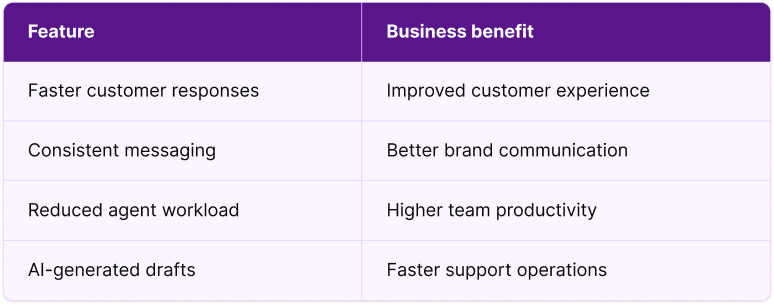
This is especially useful for businesses handling high volumes of customer conversations.
 Pepper Cloud Marketing
Why AssistAI stands out inside Pepper Cloud CRM
Unlike standalone AI tools, AssistAI works directly within Pepper Cloud CRM.
That means your teams do not need to switch between multiple applications.
Key advantages of AssistAI
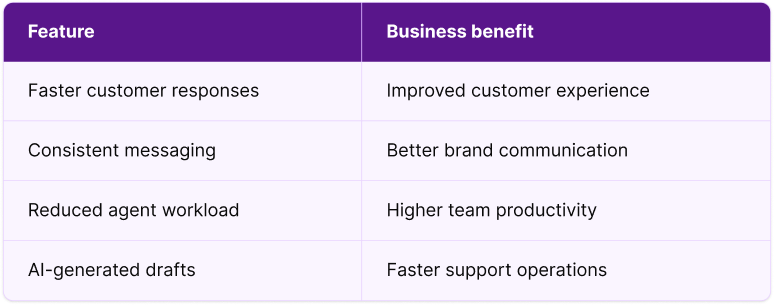
By combining conversational AI with CRM workflows, AssistAI helps organisations improve both productivity and customer engagement.
How teams can use AssistAI inside Pepper Cloud CRM
By this stage, your teams already understand what AssistAI can do — from AI reporting and CRM automation to customer replies and activity management. The next question most businesses ask is: How easy is it to use?
The good news is that AssistAI works through simple conversational prompts, so your teams can start using it without complicated training or technical expertise.
Whether users want to generate reports, update records, manage activities, or respond to customer conversations, the process feels as natural as chatting with a virtual assistant.
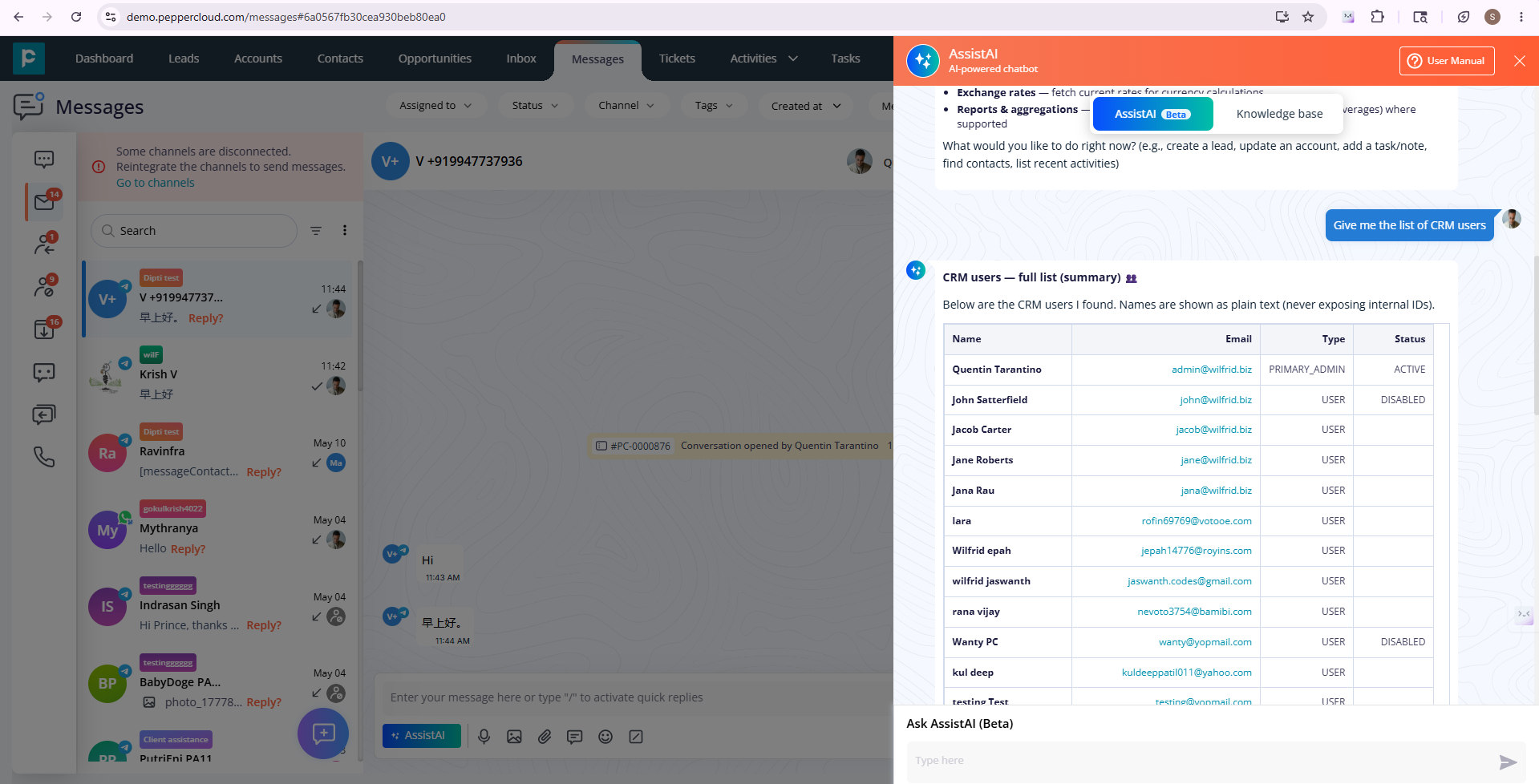
How to access AssistAI inside Pepper Cloud CRM
- Log in to Pepper Cloud CRM
- Click on the floating AssistAI icon
- Open the AssistAI window with two tabs — AssistAI and Knowledge base
- Use the AssistAI tab for reporting, record management, activity updates, and CRM commands
- Use the Knowledge base tab to ask questions from your preloaded company knowledge base
Example prompts teams can use
Users can ask conversational questions such as:
- “How many leads were converted this month?”
- “Create a task for tomorrow at 4 PM.”
- “Show opportunities assigned to David.”
- “Update the opportunity stage to negotiation.”
- “Fetch contacts linked to this account.”
AssistAI understands natural language commands and guides users whenever additional information is required.
How to use AssistAI for customer replies
AssistAI can also help teams respond to customer conversations faster, directly from the CRM message module.
- Log in to Pepper Cloud CRM
- Open the message module
- Select any customer conversation
- Click the arrow icon next to the message to draft a response via AssistAI
- Review or modify the AI-generated reply and send it
This helps teams reduce response delays, maintain consistent communication, and handle customer conversations more efficiently during busy workdays.
The future of AI-powered CRM management
AI is rapidly transforming how businesses manage customer relationships.
Companies no longer want CRMs that simply store data. They want intelligent systems that help teams take action faster.
AssistAI in Pepper Cloud CRM delivers exactly that.
From AI reporting and customer conversations to CRM record management and activity automation, AssistAI helps businesses reduce manual work while improving efficiency.
If you are looking for a smarter way to manage customer relationships, automate workflows, and empower your teams with AI-driven insights, AssistAI inside Pepper Cloud CRM can help you stay ahead.
Ready to improve AI-powered CRM reporting and automation?
Discover how AssistAI in Pepper Cloud CRM can simplify reporting, automate CRM tasks, and improve customer communication.
Book a demo today and see how AI can transform your CRM operations.