


AI chatbot knowledge base, ownership and handoffs explained
Learn how an AI chatbot knowledge base works, what information it should contain and how to manage content updates. Understand ownership responsibilities, approval processes, chatbot testing and human handoffs to improve answer accuracy and customer support quality.

Too Long? Just Read This
- An AI chatbot needs accurate and up-to-date information about the business, including products, services, pricing, policies, FAQs and troubleshooting steps.
- A knowledge base manager should oversee content updates, while teams such as product, support, sales, marketing, and IT check the information related to their work.
- Businesses should have a clear process for finding missing information, reviewing changes, updating the knowledge base and testing chatbot answers.
- Chatbots should transfer complex queries, complaints, sensitive issues, repeated misunderstandings and sales enquiries to a human agent when needed.
- During a handoff, the chatbot should share the customer's original query, conversation history, details collected and reason for the transfer so the customer does not have to repeat everything.
- Businesses should track answer accuracy, knowledge base updates, issue resolution, customer feedback and handoff performance to see where their chatbot needs improvement.
An AI chatbot knowledge base is a centralised collection of business information that an AI agent retrieves using Retrieval-Augmented Generation (RAG) to generate relevant, context-aware answers to customer queries.
It can include product details, service information, pricing, FAQs, company policies and troubleshooting documents.
For accurate responses, businesses must keep this information updated, assign clear ownership for reviewing content and establish a human handoff process for queries the chatbot cannot resolve.
Without these processes, the chatbot may retrieve outdated information or provide incomplete answers, affecting customer trust and support quality.
How a chatbot knowledge base actually works
A knowledge base is used to provide chatbots with the necessary information to understand and answer questions.
When a user asks a question, the chatbot will determine what they're asking for and search its linked knowledge sources to find the relevant information.
Many AI chatbots and AI agents use retrieval-augmented generation (RAG) to retrieve relevant information from approved knowledge sources and generate accurate, contextually relevant responses.
1. Collecting information from business sources
The first step will be to gather information from your business sources. This allows teams to collate existing information and approved sources into one knowledge base.
These may include:
- Website information: product pages, service information, price information and company information.
- FAQs: Frequently asked questions, how to set up and troubleshooting.
- Product information: Specifications, features, compatibility and how to use.
- Business Policies: Returns, refunds, cancellations, shipping, warranty and payment.
- Internal documents: SOPs, approved support information and sales processes.
- Connected Business systems: CRM, stock information, booking systems, and support tickets, if they have the correct integrations.
You will add your specific business information here in the chatbot
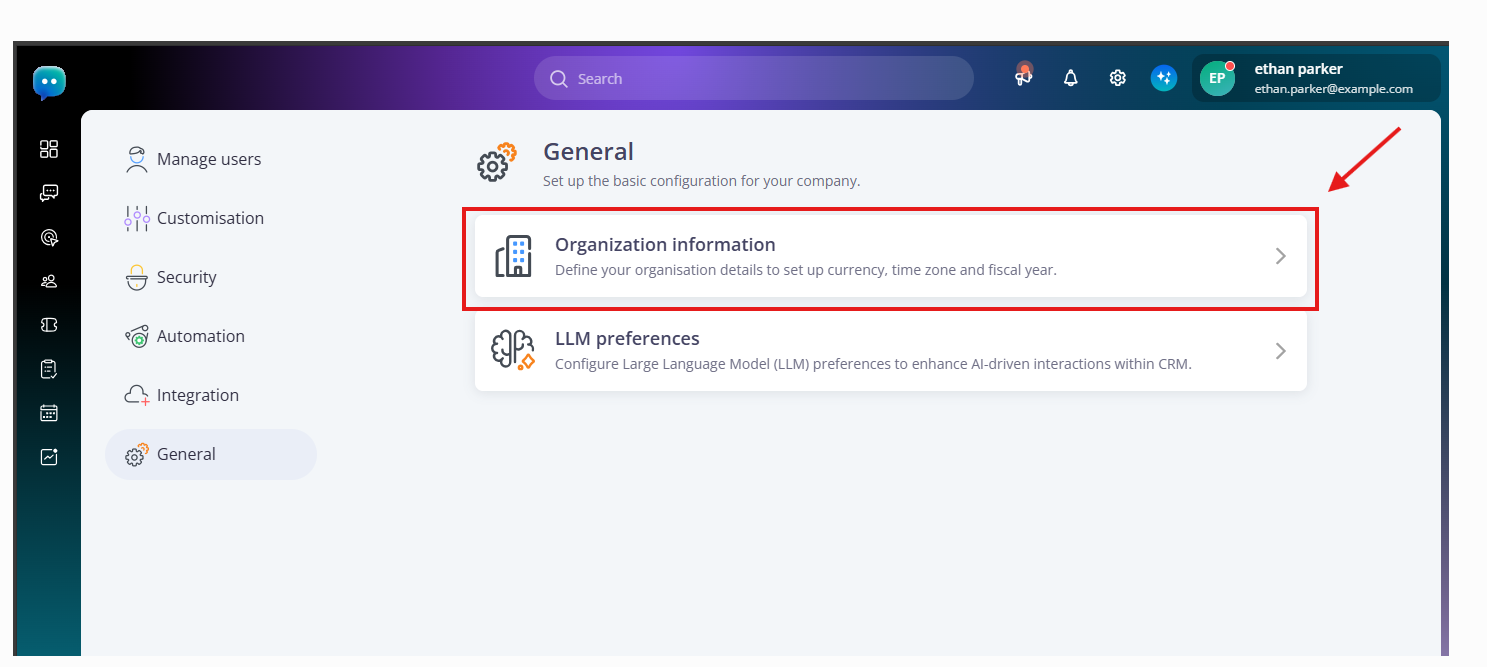
You will want to ensure that the information you are pulling from will be relevant to what your chatbot will be answering.
If your chatbot answers product-related questions, you wouldn't want to give it access to irrelevant employee documents or sensitive financial information.
2. Organising and processing the information
Once you have gathered the information, you need to prepare it so the AI chatbot can search and retrieve relevant content. This involves five key steps:
- Extract: Extract text and relevant information from PDFs, Word documents, website pages, FAQs and other sources. Use OCR to read text from scanned documents when needed.
- Clean: Remove duplicate documents, outdated details, irrelevant content and formatting inconsistencies.
- Chunk: Break long documents into smaller, meaningful sections. Each chunk should cover a specific topic, such as product specifications, pricing or troubleshooting.
- Embed: Convert each text chunk into a numerical representation called an embedding. This helps the chatbot understand the meaning of the information and find relevant content, even when the customer's wording differs.
- Index: Store the text chunks, embeddings and relevant metadata in a searchable index, such as a vector database, so the chatbot can retrieve the right information when answering questions.
For example, if your company sells electronic equipment, you could organise the knowledge base into:
- Product specifications and compatibility.
- Prices and payment options.
- Shipping and delivery.
- Returns and warranty.
- Installation and troubleshooting.
When a customer asks whether a device is compatible with their laptop, the chatbot searches the indexed information, retrieves the relevant product details and uses them to generate an answer.
Update and re-index the information whenever important business details change to keep chatbot responses accurate.
3. Retrieving relevant information when a customer asks a question
When a customer asks a question, the AI chatbot analyses the message along with the conversation history to understand the intent and context. It then searches the indexed knowledge base for relevant information.
For example, a customer might first ask:
"Do you sell wireless headphones?"
After receiving an answer, the customer asks:
"Can I return them if I have already opened the box?"
The chatbot uses the previous message to understand that "them" refers to wireless headphones. It then retrieves the relevant returns policy and checks the conditions for opened products.
If the knowledge base does not contain the required information, the chatbot may use other connected and authorised sources, such as website content or external data sources, if those are enabled.
If it still cannot find a reliable answer, it should direct the customer to human support rather than make up information.
4. Generating an answer using retrieved information
Once the chatbot retrieves relevant information, generative AI uses it to create a clear, natural-language response.
This approach is often supported by Retrieval-Augmented Generation (RAG), which grounds the answer in information retrieved from the knowledge base rather than relying only on the AI model's training data.
RAG reduces the risk of hallucinations (made-up or inaccurate answers) by providing relevant source information for the chatbot to use. It does not eliminate errors, so the chatbot should avoid making claims that are not supported by the retrieved content.
For example:
"You can return the headphones within 10 days of delivery, provided they meet the return conditions. Opened products may have additional restrictions. Would you like me to connect you with our support team to check your specific case?"
The chatbot should reflect the actual return policy and never guarantee approval when the conditions require further verification.
5. Improving responses through testing and updates
A knowledge base will need to be maintained regularly as information within your business will change.
You should look at the questions that aren't being answered, incorrect answers, customer feedback and any repeated escalations to see what information is missing or out of date.
For example, if customers are frequently asking about a new payment option that you can't explain, then you need to update your knowledge base.
Businesses that implement this can follow the steps in this guide to train a GenAI chatbot for business in 2026.
What to include in your chatbot’s knowledge base
A chatbot knowledge base should contain accurate, relevant, and approved information that helps customers complete their intended tasks.
The exact content depends on the chatbot's purpose, industry, and the types of questions customers ask.
The following categories provide a useful starting point.
1. Company and business information
Include basic information that helps customers understand the business and its services.
This may cover:
- Company background and business overview
- Office locations and contact details
- Business hours and holiday schedules
- Available service locations
- Official communication channels
- Support contact information
This information is particularly useful for chatbots that handle initial customer enquiries.
2. Product and service information
Product and service information helps customers understand what a business offers before making a purchase or requesting a service.
Include:
- Product names and descriptions
- Features and specifications
- Available sizes, colours, and variations
- Service packages and subscription plans
- Product compatibility and limitations
- Usage instructions and technical requirements
- Product availability, where live inventory access is supported
For example, if a customer asks whether a particular software subscription supports multiple users, the chatbot should retrieve the relevant plan information rather than provide a general answer.
3. Pricing, payments, and billing information
Pricing-related questions often influence purchasing decisions. Incorrect answers can create confusion and damage customer trust.
Your knowledge base should include:
- Product and service prices
- Subscription plans
- Additional charges
- Accepted payment methods
- Billing cycles
- Discounts and promotional conditions
- Refund and payment-related policies
If prices change frequently, connect the chatbot to an authorised, regularly updated source where possible. Avoid relying on old PDF brochures or documents containing conflicting prices.
4. Policies, terms, and conditions
Customers frequently ask about what they can and cannot do after purchasing a product or service.
Include approved information about:
- Returns and refunds
- Cancellations
- Shipping and delivery
- Warranty coverage
- Subscription renewals
- Payment terms
- Privacy policies
- Service limitations
Make sure the chatbot can distinguish between explaining a policy and approving an action. For example, it may explain refund eligibility, but an actual refund may require account verification and authorised approval.
5. FAQs and troubleshooting instructions
FAQs help chatbots respond to recurring questions without requiring customers to search through multiple pages.
Include questions about:
- Account registration and login
- Product setup and configuration
- Order tracking
- Payment failures
- Common technical problems
- Service availability
- Account changes
- Frequently reported issues
Troubleshooting content should explain the steps in the correct order, including what customers should do if an initial solution does not work.
6. Sales and lead qualification information
Businesses using chatbots for lead generation should also include information that helps prospects evaluate their offerings.
Useful content includes:
- Product comparisons
- Service recommendations
- Industry-specific solutions
- Pricing and package details
- Eligibility requirements
- Common customer objections
- Consultation and demo booking information
The chatbot can use this information to understand customer requirements and collect relevant lead details.
For example, a customer looking for a CRM solution might ask about team size, integrations, pricing, and automation capabilities. The chatbot can answer these questions and collect the prospect's requirements before passing a qualified enquiry to the sales team.
For businesses managing enquiries across messaging platforms, this guide to GenAI chatbot conversations on WhatsApp and Instagram explains how business information supports automated customer interactions.
7. Internal processes and standard operating procedures
Some chatbot use cases require access to approved internal procedures, particularly when supporting employees or helping customers complete structured processes.
These may include:
- Customer onboarding steps
- Account verification procedures
- Appointment booking instructions
- Support escalation procedures
- Order processing guidelines
- Employee training materials
- Approved sales and service workflows
However, not every internal document should be available to every chatbot. Businesses must configure access permissions according to the chatbot's purpose and the information each user is authorised to receive.
8. Live information from connected business systems
A static knowledge base cannot always answer questions that depend on changing customer or business information.
For example, a customer asking about an order placed yesterday needs the latest order status, not a general delivery policy.
Where supported, connect the chatbot to authorised systems such as:
- CRM platforms for customer and lead records
- Inventory systems for product availability
- Order management systems for order status
- Booking platforms for appointment availability
- Helpdesk systems for support ticket updates
- Payment systems for authorised transaction information
These integrations require appropriate authentication, permissions, and safeguards. A chatbot should retrieve only the information it has been explicitly authorised to access or act on.
Who should own the knowledge base? Defining clear ownership
The knowledge base should be managed by one clear owner who will oversee how it is maintained. Departments will be responsible for verifying the information within their scope.
Consider which teams will verify the information. For example, your support team may be able to understand what your customers are asking; they may not be the best people to verify any price changes or legal policies.
Similarly, your marketing team may not be aware of the latest technical troubleshooting steps.
1. Knowledge Base Manager
The knowledge base will be managed by a knowledge base manager or content owner.
This person will be responsible for:
- Maintaining the content structure
- Spotting any gaps in the content
- Assigning updates to the right teams
- Coordinating content to be reviewed and approved
- Identifying out-of-date and duplicated content
- Keeping track of updates and versions
Not all smaller businesses will require a dedicated person to do this. This role can often be done by your customer support manager, operations manager or content manager.
The key thing is to make sure there is someone who will be responsible.
2. Product & Technical Teams
Information about products should be verified by product managers and technical experts.
When a software company releases a new feature, the product team should be able to provide accurate information about how the new feature works and any restrictions.
This will ensure your chatbot doesn’t talk about features that have been retired or promise something that isn’t available.
3. Customer Support Team
Customer support agents will have regular contact with customers and will understand the questions, complaints and issues they are facing.
- They should be able to help identify:
- Common questions
- Missing FAQ topics
- Incorrect answers given by the chatbot
- Common troubleshooting issues
- Unclear policy explanations
- Regular questions that require human support
They can highlight these issues, and the right content owner can create and verify the updates.
4. Sales & Marketing Teams
Content relating to pricing, promotions, product positioning, packages and customer communications should be reviewed by the sales and marketing teams.
If a promotion has expired, the marketing team should ensure the chatbot no longer talks about this promotion.
The sales team can also identify common objections and questions that are preventing prospects from progressing. This can be used to improve the product explanations and lead qualification responses given by the chatbot.
5. IT & Security Teams
The IT and security teams will help ensure your knowledge base and related systems are secure.
They may be responsible for:
- Setting up user/system permissions
- Managing any API’s
- Keeping confidential information safe
- Reviewing what data needs to be accessed
- Monitoring any failed integrations
- Ensuring the right security measures are in place
This is particularly important if your chatbot is accessing CRM records, customer information, order information or internal company documents.
6. Establishing a clear approval and update process
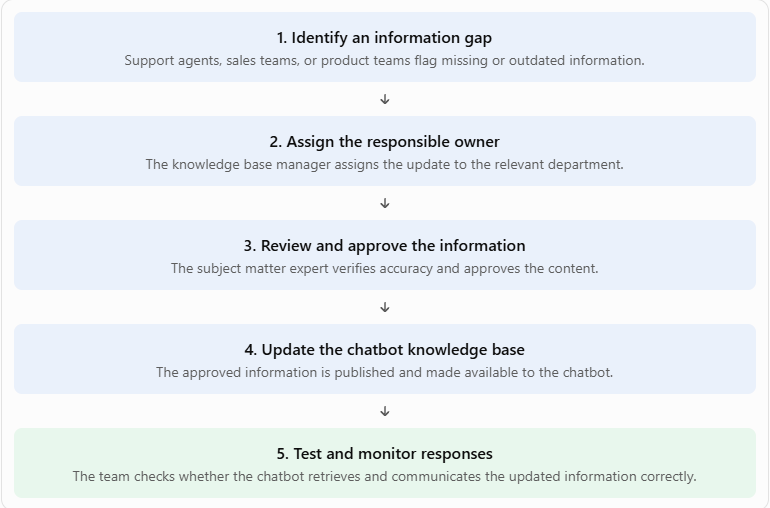
Defining individual responsibilities is not enough. Businesses also need a process that explains how information moves from identification to publication.
A practical ownership workflow looks like this:
What is a chatbot-to-human handoff?
A chatbot-to-human handoff is the process of transferring a customer conversation from an AI chatbot to a human agent when the query requires personal attention, a decision, or support beyond the chatbot’s capabilities.
A well-designed handoff should happen at the right time, without making customers repeat information they have already shared.
When should a chatbot transfer a conversation?
Common handoff situations include:
- Complex queries: The customer asks something that requires detailed investigation or a response outside the chatbot's knowledge.
- High-intent leads: A prospect requests a product demonstration, custom quote, bulk pricing, or a sales conversation.
- Sensitive issues: The conversation involves complaints, payment disputes, personal information, or account-related concerns.
- Repeated misunderstandings: The chatbot fails to understand or resolve the same query after a reasonable number of attempts.
- Customer requests: The customer explicitly asks to speak with a person.
What information should be transferred?
The chatbot should provide the agent with the conversation history, initial customer request, key information gathered, reason for escalation and actions taken so far.
This allows the agent to continue the conversation without the customer needing to start from the beginning.
A simple handoff process looks like this:
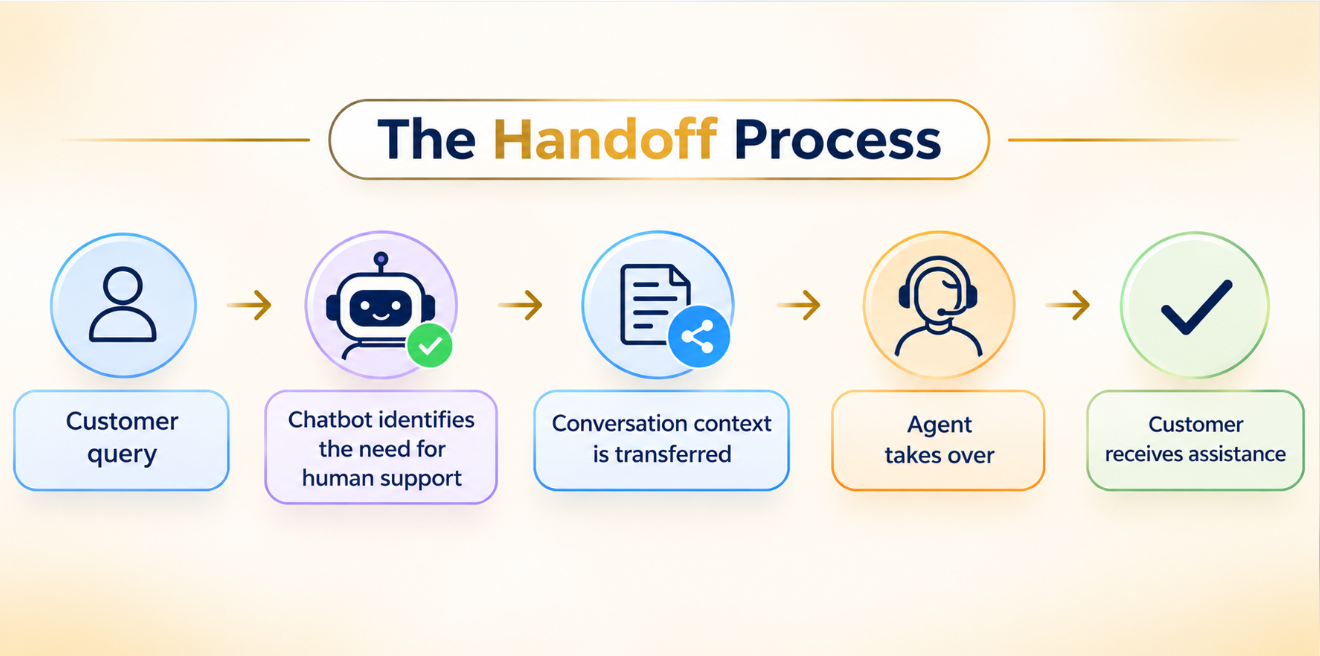
Customer query → Chatbot identifies the need for human support → Conversation context is transferred → Agent takes over → Customer receives assistance
Businesses should also plan for situations when no agent is available.
The chatbot can collect the customer's contact details, explain the expected response time, and create a support request for follow-up.
Customer consent, privacy notices, and access permissions also matter.
If chat history or personal information is shared with an agent or another system, businesses should explain how that information will be used and limit access to what is necessary.
Common mistakes with knowledge bases, ownership, and handoffs
- Uploading content without organising it: Adding large documents without proper structure or content chunking can make relevant information harder for the chatbot to retrieve. Break content into clear, topic-based sections and retain important headings and context.
- Keeping outdated or conflicting information: If your chatbot has old content like pricing pages, policies and product information, you may get conflicting answers. Keep just one source of truth and keep track of versions. Remove or archive any out-of-date information.
- Leaving ownership undefined: Without an owner for your chatbot content, mistakes may go unnoticed. Assign an owner for each piece of key knowledge and include subject matter experts for when there are technical or policy changes to be approved.
- Testing only common questions: Your chatbot may be answering simple FAQs, but when customers ask questions in a different way or about exceptions, it may struggle. Test your chatbot with simple questions, alternative phrasing, edge cases and questions your chatbot shouldn’t answer.
- Making human handoffs difficult: If you have no context when escalating customers, it can cause frustration. Include relevant context for the agent and make it easy to escalate.
- Assuming all answers are accurate: AI chatbots can give confident but incorrect answers. Ensure answers are based on sources of truth, be clear with limitations and send any uncertain or sensitive queries to a human.
- Not considering privacy or languages: Conversations with customers may include personal information, and not all knowledge articles may be available in all languages. Ensure you have the correct controls in place for data and review any translated content to ensure it is accurate.
How to measure knowledge base and handoff performance
A chatbot should not be measured only by the number of conversations it handles. Businesses need to understand whether it retrieves the right information, resolves customer issues, and transfers conversations successfully.
The following metrics provide a practical way to evaluate performance:
Conclusion
An effective AI chatbot depends on more than its ability to answer customer questions. It needs a well-organised knowledge base, clear content ownership, and a reliable process for transferring conversations to human agents.
Businesses should regularly review and update chatbot information, test responses against real customer questions, and ensure that unresolved or sensitive queries reach the right person.
Tracking retrieval accuracy, resolution rates, customer satisfaction, and handoff performance also helps identify where improvements are needed.
When these elements work together, an AI chatbot can deliver consistent answers, reduce repetitive support work, and create smoother customer experiences without replacing the human assistance customers sometimes need.
FAQs
1. How can businesses identify gaps in an AI chatbot knowledge base?
Review unanswered questions, fallback responses, repeated queries, customer feedback, and conversations escalated to agents. These patterns reveal missing or unclear information that needs to be added or updated.
2. Can an AI chatbot improve its answers using previous customer conversations?
Yes. Businesses can analyse past conversations to identify common questions and knowledge gaps. However, new information should be verified by subject-matter experts and approved before being added to the knowledge base.
3. How should an AI chatbot handle conflicting information from different knowledge sources?
Businesses should define an approved source of truth and prioritise verified, up-to-date content. If conflicting information remains, the chatbot should avoid guessing and transfer the query to a human agent.
4. What should happen when a human agent is unavailable during a chatbot handoff?
The chatbot should offer alternatives such as creating a support ticket, requesting a callback, or joining a queue. It should preserve the conversation details and communicate the expected response time.
5. How can businesses reduce repeated questions after an AI chatbot transfers a conversation?
Transfer the conversation history, customer details, issue summary, and troubleshooting steps already attempted. This gives the agent enough context to continue without asking the customer to repeat everything.