


Workflow automation use cases every SMB should implement
Workflow automation helps SMBs eliminate repetitive tasks, improve response times, and streamline operations. Explore practical automation use cases that enhance productivity, reduce delays, and create better customer experiences across sales, support, and operations.

Have you ever calculated how many hours your team loses every month simply waiting for replies, waiting for documents, waiting for approvals, and waiting for follow-ups? A Deloitte study found that employees spend nearly 28% of their week on repetitive administrative tasks, most of which can be automated.
For decision-makers across sales, operations, HR, customer support, healthcare, staffing, and professional services, workflow automation is no longer a “technical upgrade”. It is a growth lever, a cost reducer, and a customer-experience differentiator.
For most organisations, the real challenge is not the lack of tools; it is the inability to identify the right workflows that genuinely move the needle.
SMB’s leaders often ask, "Where exactly should we automate first?" Which processes will deliver the highest impact? And how do we remove delays without overwhelming teams?
To help you answer these questions, this blog outlines highly specific workflow automation scenarios, each paired with a real workflow sample within the Pepper Cloud AI WhatsApp CRM.
Why is workflow automation now an SMB priority?
The pace of business has never been faster. Customers expect immediate replies. Prospects expect personalised engagement. Teams expect seamless internal coordination. And leaders expect predictable growth.
Yet, manual workflows often lead to:
- Missed follow-ups
- Delayed responses
- Human errors
- Slow onboarding
- Customer churn
- Poor experience consistency
A report found that 71% of growing businesses now depend on automation tools to streamline processes and free up teams for more strategic work. Workflow automation isn’t about replacing humans, it is about empowering them.
With systems like Pepper Cloud AI WhatsApp CRM, business leaders can automate everything from WhatsApp notifications to renewal reminders, document submissions, cross-department updates, and follow-ups, all without writing a single line of code.
Below are the automation scenarios that immediately transform efficiency across your organisation.
Send automated follow-up email after a quote is sent
Ensure prospects receive a timely follow-up message a few days after receiving a quotation to keep the deal top-of-mind and encourage a decision.
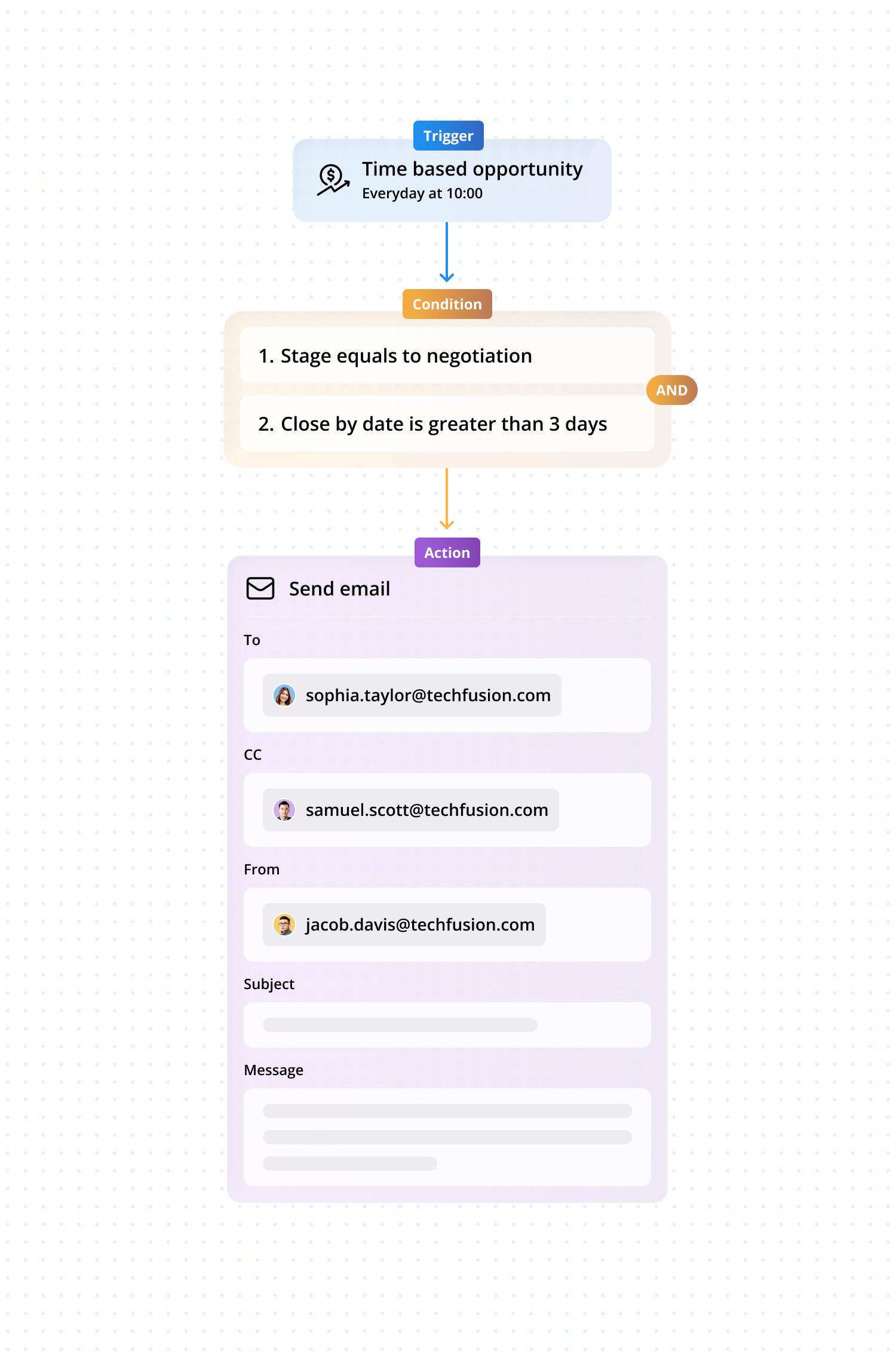
Workflow sample:
- Trigger: Opportunity
- Trigger type: Time-based trigger
- Period: Every day
- Time: 10:00 AM (Customisable)
- Condition:
- Properties: Stage
- Condition: is equal to
- Value: Quote Sent
- AND
- Properties: Last Stage Change Date
- Condition: is greater than
- Value: 3 days ago
- Action:
- Item: Email
- Event: Send Email
- Choose: Add "To" email, Subject: "Quick follow-up on your quote," and Message.
Send an automated re-engagement email to dormant leads to dormant leads
Automatically send a sequence of emails to leads who haven't engaged (e.g., opened an email, clicked a link) in a set period to reactivate them.
Workflow sample:
- Trigger: Lead
- Trigger type: Time-based trigger
- Period: Every Monday
- Time: 11:00 AM (Customisable)
- Condition:
- Property: Lead tag
- Condition: Contains
- Value:
- Not replied
- Cold reply
- Additional condition:
- Property: Last interaction date
- Condition: Is before
Value: 40–60 days ago
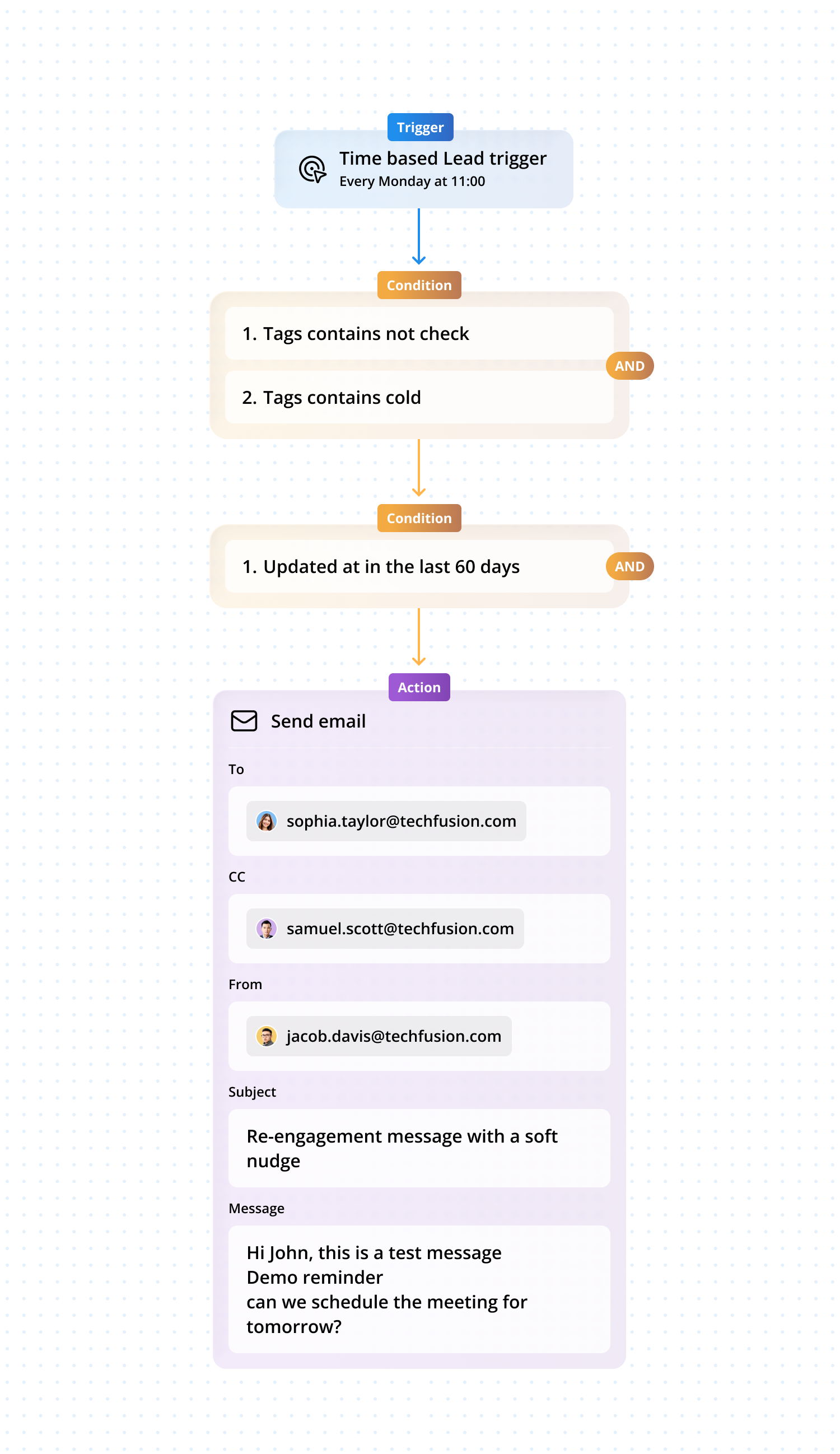
(This ensures the message is sent only to leads who haven’t responded within the defined cooling period.)
- Action:
- Item: Message / Email
- Event: Send automated message
- Content:
- Re-engagement message with a soft nudge
- Optional value offer (resource, demo reminder, or update)
- Clear CTA to restart the conversation
Send a follow-up email if a contact downloads a resource
Automate a follow-up email to contacts who download a resource (e.g., a white paper) from the website (captured via an integrated web form).
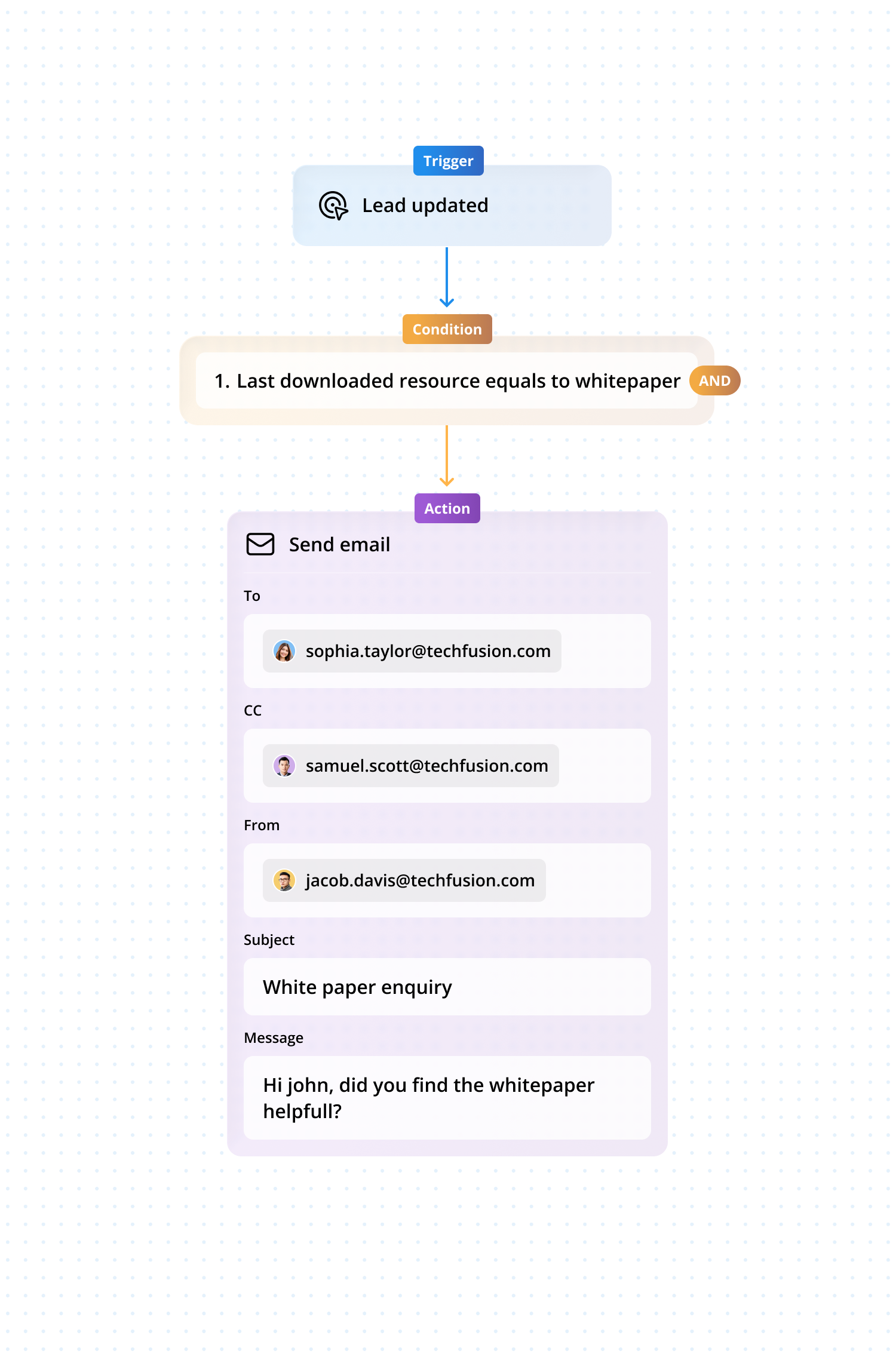
Workflow sample:
- Trigger: Lead
- Trigger type: Record update (via Integrated Form)
- Condition:
- Properties: Last downloaded resource
- Condition: Is equal to
- Value: Whitepaper X
- Action:
- Item: Email
- Event: Send email
Choose: Email with message asking if they found the Whitepaper helpful.
Send an Email reminder when the subscription renewal date is approaching
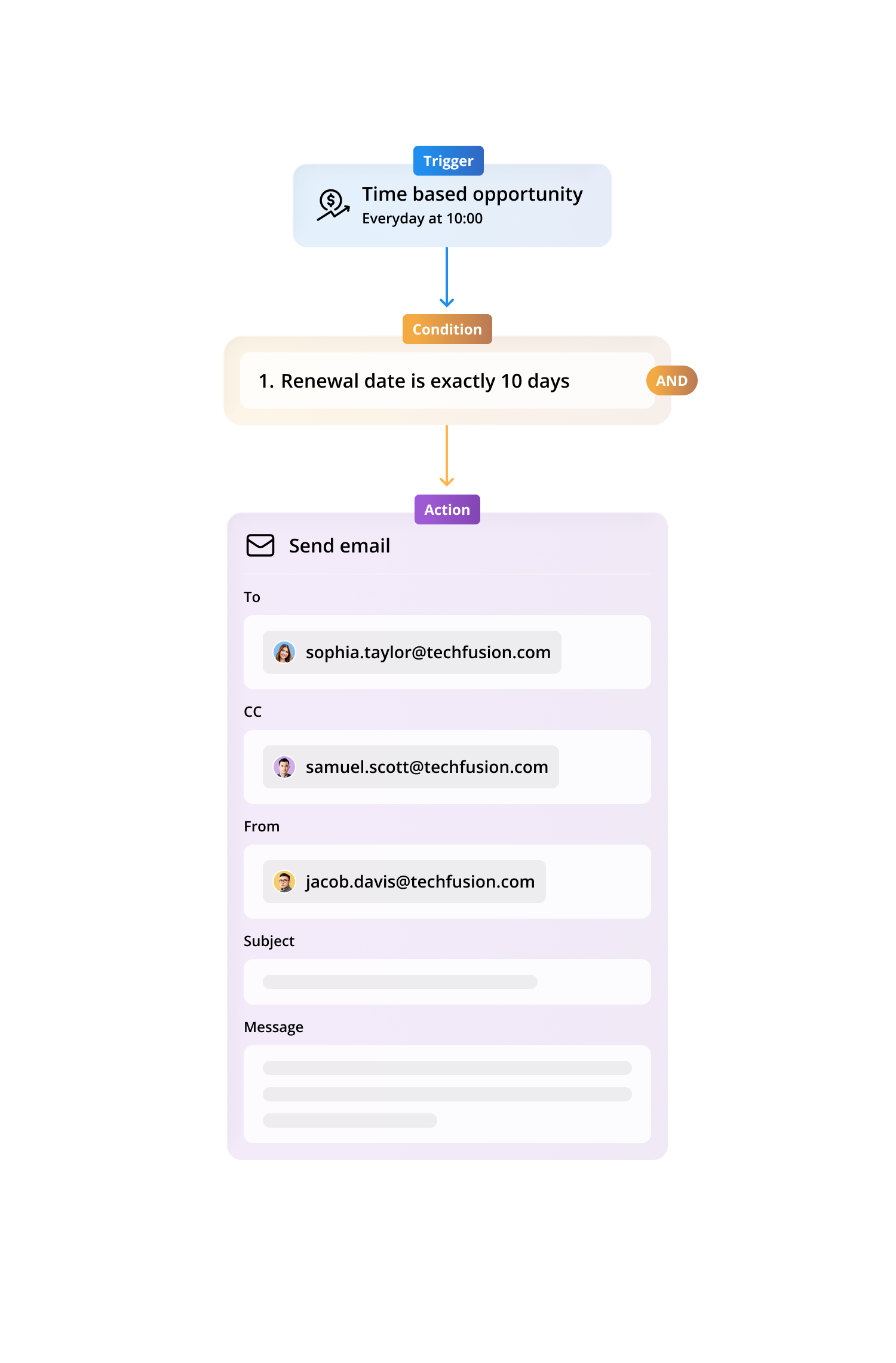
Sales representatives often focus heavily on acquiring new customers, which means existing clients may not always receive proactive renewal communication. This oversight can lead to unnecessary churn and revenue leakage.
Automating renewal reminders ensures that customers receive timely emails long before their subscription expires, giving them sufficient time to review, renew, or clarify details without the salesperson having to manually track dates.
Here is a workflow sample for this scenario:
Trigger: Opportunity
Trigger type: Time-based trigger
Period: Every day
Time: 09:00 AM
- Properties: Renewal date
- Condition: Exactly
- Value: 10 days
- Item: Email
Event: Send email select the “To” address, CC if needed, fill in the subject line, and craft the renewal reminder message.
Note: You may need to create a custom field called “Renewal date” in the Opportunity module. Once the workflow is enabled, it will run on the selected time period and trigger email reminders automatically. Emails can be sent to the assigned salesperson or directly to the customer.
Auto-send product catalogue after “request info” form submission
Customers expect immediate access to information. Automated delivery builds credibility.
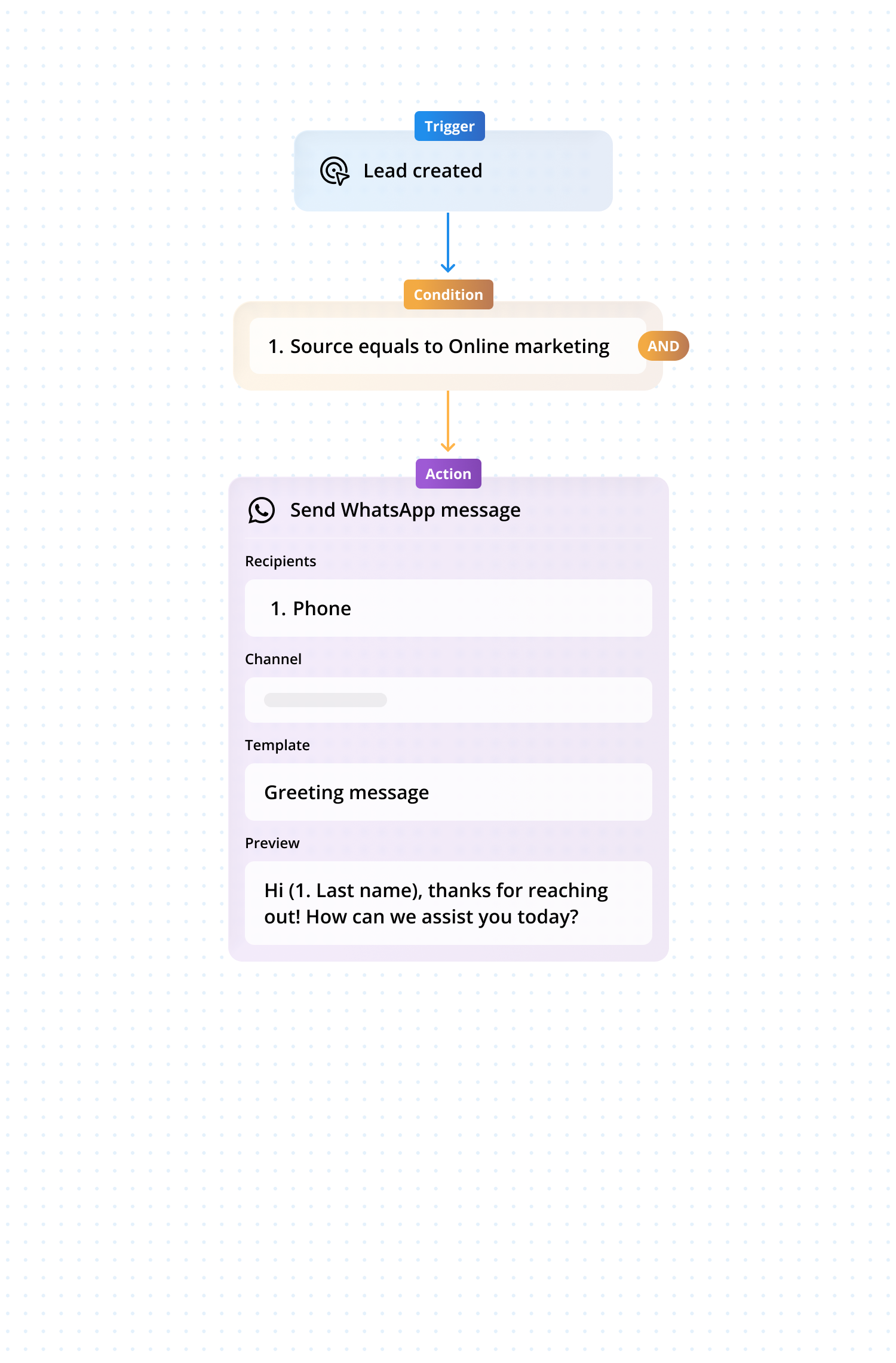
Workflow sample
Trigger
- Trigger type: Lead created
- Source: Web form submission
- Form type:
- Request info
- Sales query
- Product enquiry
Condition
- Property: Lead source
- Condition: Equals
- Value: Web form / Sales query
(This ensures the automation runs only for inbound leads, not imported or purchased lists.)
Action
- Channel: WhatsApp
- Event: Send template message
- Template type: Media template
- Attachment: Product catalogue (PDF)
Note: Sending a WhatsApp template that has a catalog as a PDF attachment.
Auto WhatsApp follow-up for non-responsive leads
Goal: Automatically send gentle follow-ups if a new lead doesn’t reply, so no enquiry is forgotten.
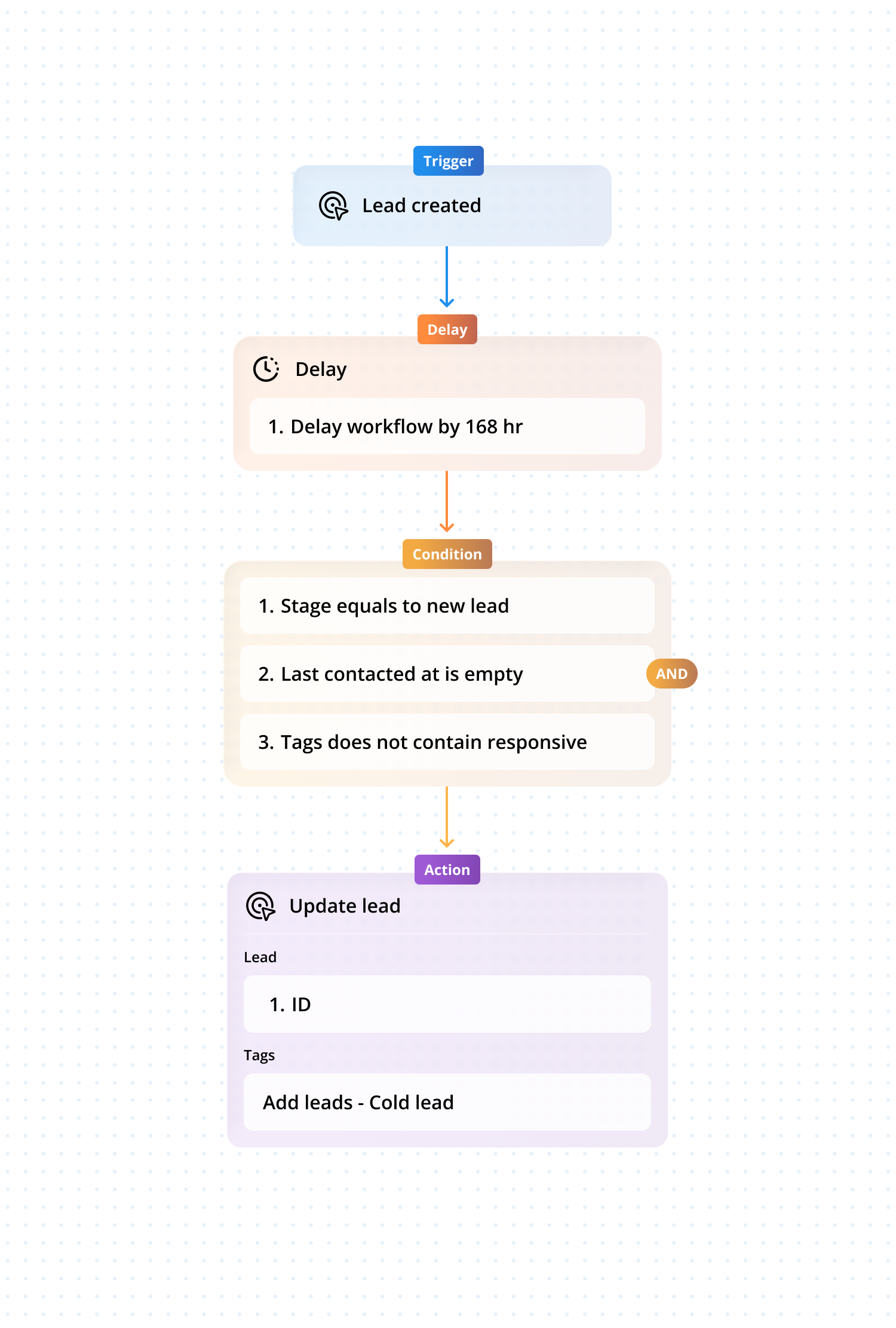
Action 1: Wait
Wait period: 7 days (Purpose: Give the lead enough time to respond organically)
Conditions (After 7 Days)
- Property: Stage
- Condition: Is equal to
- Value: New lead
- Property: Last incoming WhatsApp message date
- Condition: Is empty OR earlier than lead creation date
- Property: Tag
- Condition: Does not contain
- Value: Responsive
Actions (If conditions match)
- Item: Lead
- Add tag: Non-responsive (or custom tag like Cold Lead – No Reply)
Add to list: Cold lead / Re-engagement pool
This cleanly separates leads who never replied from active conversations.
Wrapping up
As you have seen throughout this blog, workflow automation isn’t about replacing teams, it is about empowering them. When repetitive tasks run automatically, your people gain more time to think, solve, build, and grow.
These 25 use cases represent real challenges faced by modern companies and real opportunities to transform efficiency, customer experience, and internal collaboration.
Your next step is simple: start with the workflows that give you the highest impact and scale from there. And if you are unsure where to begin, we’re here to help.
Want personalised automation recommendations for your business? Get in touch with us and let’s build your next set of powerful workflows together.


