


5 Sales tasks to automate in CRM for faster deal closures
Sales teams often lose deals due to slow responses, inconsistent follow-ups, and manual processes. This article explores five high-impact sales tasks businesses can automate in their AI CRM to streamline workflows, improve response time, and close deals faster.

Ask most sales teams why deals stall, and you will often hear the same answer: not enough leads. But when you look closely at the day-to-day workflow, the problem is usually something else.
- A lead comes in from a website form. Someone plans to follow up.
- A WhatsApp enquiry arrives while the team is in a meeting.
- Notes from a sales call sit in a spreadsheet waiting to be added to the CRM.
Individually, these steps seem small. But across dozens of conversations and opportunities, they start to slow everything down.
Not because the team is not working hard but because too many small tasks sit between a lead and the next conversation.
According to the Forbes, sales representatives spend only about 32.5% of their time actually selling, while the rest is consumed by administrative work, data entry, and internal tasks.
And in sales, timing matters more than most teams realise. The widely cited 5-Minute Lead Response Rule suggests that responding to a new enquiry within five minutes dramatically increases the chances of meaningful engagement, as opposed to delaying it further.
This is why many growing sales teams are turning to AI WhatsApp CRM sales automation. When routine sales tasks run automatically in the background, teams can respond faster and spend more time on the conversations that actually move deals forward.
In this blog, we’ll walk through five sales tasks you should automate in your CRM to close deals faster and build a more efficient sales process.
How AI CRM sales automation fits into the modern sales workflow
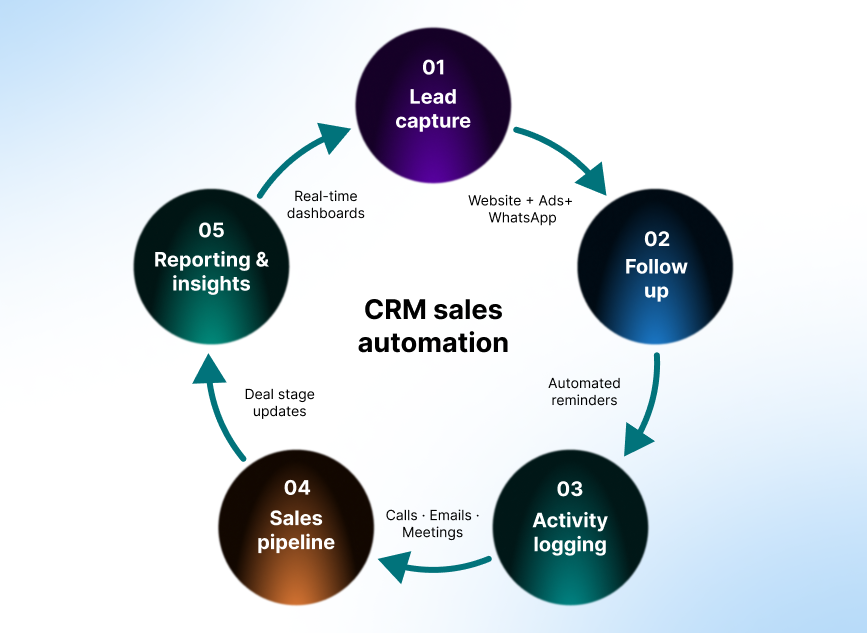
Before diving in, it helps to look at the sales process as a series of connected steps.
From the moment a lead enters your system to the point where a deal is won or lost, every opportunity moves through the same operational flow. When too many of those steps rely on manual work, delays start to add up.
Automating key parts of this workflow removes those bottlenecks and keeps opportunities moving forward. The five tasks we’ll explore follow the natural flow of a sales conversation:
- Capturing and routing new leads
- Following up with prospects
- Logging sales activities
- Updating the pipeline
- Turning sales data into insights
Let’s start with the first place many sales processes break down: how leads are captured and assigned.
1. Automate lead capture and assignment
For many growing sales teams, the first breakdown in the sales process happens before a conversation even begins.
For example, let’s imagine a small B2B company running Google ads while also receiving enquiries through its website and WhatsApp. Leads arrive often from these multiple channels at once, and someone on the team must capture those details, enter them into the CRM, and assign the lead to the right sales representative.
When this process relies on manual effort, delays are almost inevitable.
Studies on lead response time show that for every 10-minute delay in contacting a new lead, conversion chances lower by 400%. Yet in many sales teams, new enquiries sit unattended while someone updates spreadsheets or manually routes leads.
CRM automation removes that delay.
Instead of relying on manual entry, a CRM can automatically capture leads from multiple sources. Once captured, the system can immediately assign each lead to the appropriate salesperson based on predefined rules such as geographic territory, product interest, lead source, or sales representative availability. Then, it sends a notification so the rep can respond right away.
Here's what the workflow may look like in practice:
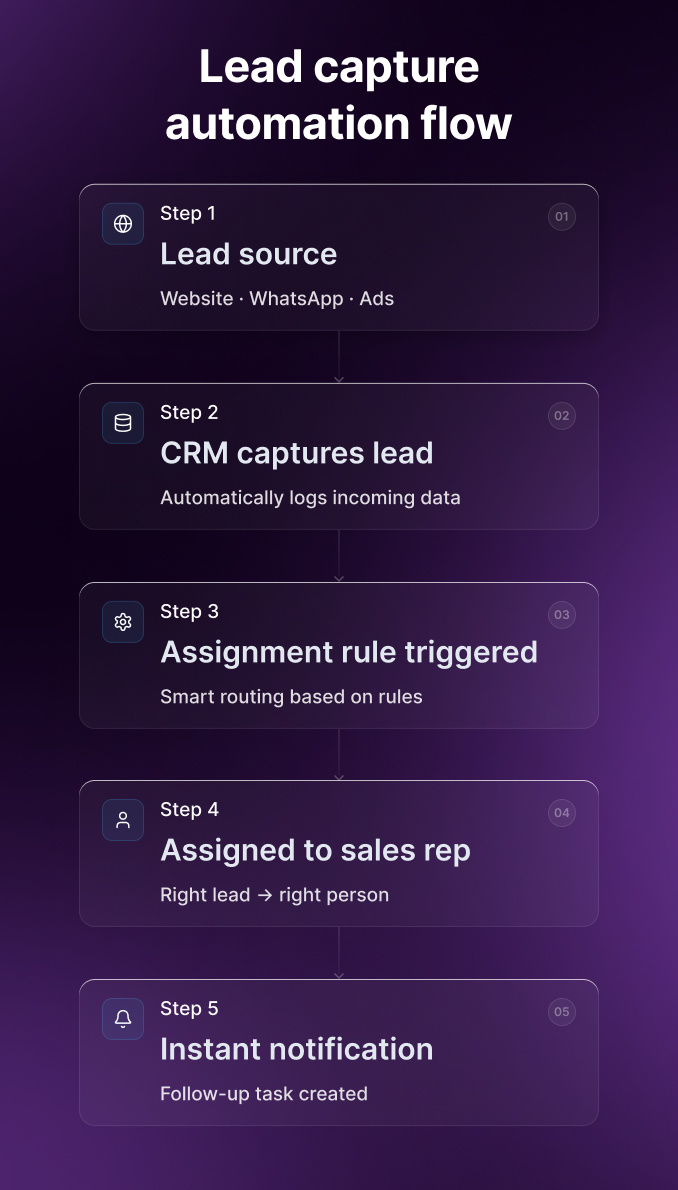
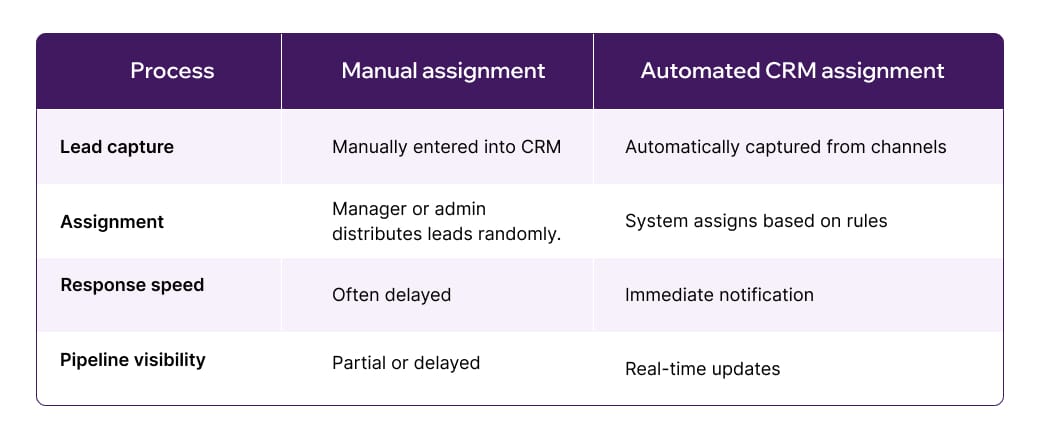
This eliminates the gap between lead arrival and first contact, a moment that often determines whether a prospect stays engaged or moves on. The difference becomes clearer when comparing manual and automated processes.
Key takeaway
The faster a new inquiry reaches the right salesperson, the higher the chance that the conversation begins while the prospect’s interest is still fresh.
When lead capture and routing happen automatically, every enquiry enters the sales pipeline immediately and reaches the right person without waiting for administrative steps. In other words, automation ensures that the team spends less time managing incoming data and more time engaging prospects.
2. Automate follow-ups and reminders
Once leads are captured and assigned automatically, the next challenge is ensuring that conversations continue until a clear outcome is reached.
This is where many opportunities quietly stall in many organisations.
Sales representatives often intend to follow up after a call, send additional information, or reconnect a few days later. But between meetings, new enquiries, and administrative work, those intentions can easily slip. And when that happens, prospects lose momentum and deals drift.
Sales CRM automation addresses this by turning follow-ups into a structured process rather than a personal responsibility. Instead of relying on each salesperson to track the next steps, the system schedules tasks, reminders, and follow-ups based on predefined CRM automation workflows and follow-up cadence.
For example, consider a prospect who sends an enquiry via WhatsApp requesting a product demo. With AI WhatsApp CRM, the lead is captured automatically and assigned to a sales representative, who responds and shares initial information. From that point onward, the CRM manages the follow-up sequence.
If the prospect does not respond, the system prompts the rep to check in. If the prospect engages, the workflow adapts and schedules the next action. The conversation progresses in a controlled, predictable way.
A typical automated follow-up cadence might look like this:
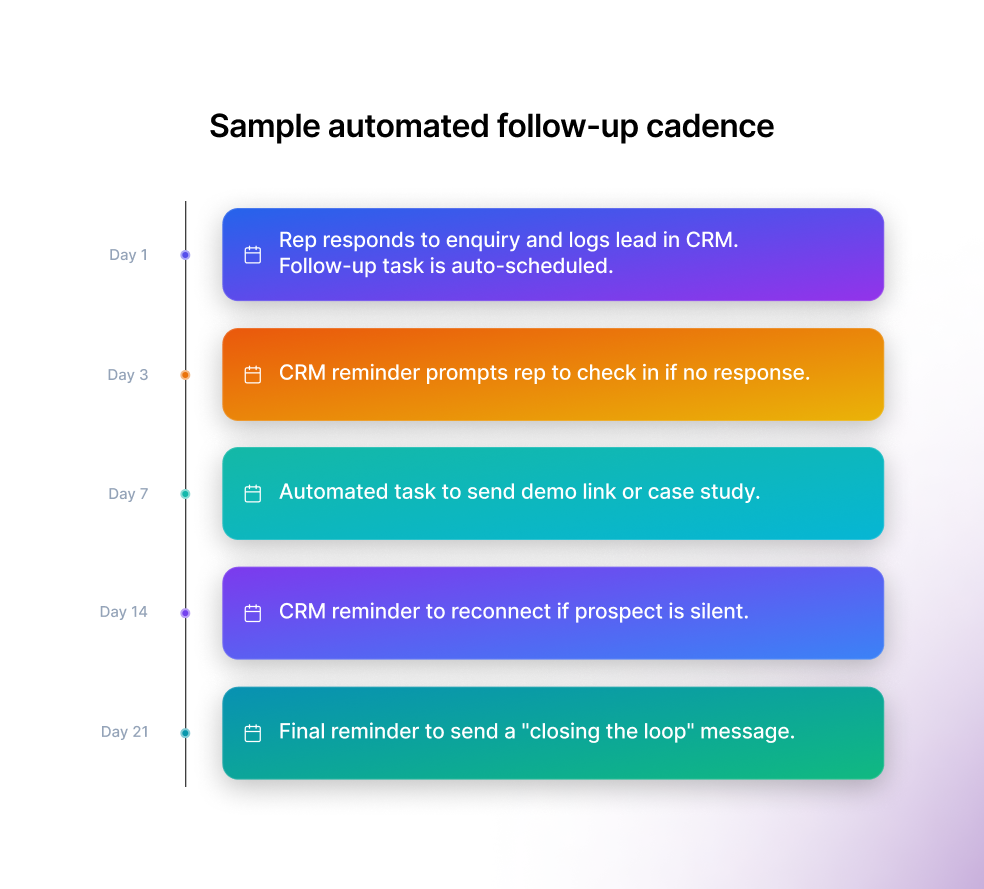
The cadence defines when outreach should happen, while the CRM workflow ensures those actions occur automatically. This approach allows teams to maintain consistent communication across hundreds of conversations simultaneously without increasing administrative effort.
Sales insight
Automation doesn’t replace the human side of selling; it simply ensures that important conversations don’t get forgotten.
With reminders and follow-up tasks running quietly in the background, sales teams can focus on building relationships and guiding prospects toward a decision.
3. Automate sales activity logging
As deals progress, another operational challenge begins to appear: keeping the AI WhatsApp CRM up to date.
Sales teams generate a constant stream of calls, emails, meetings, demos, and follow-ups. Each interaction adds valuable context to a deal and helps teams understand where an opportunity stands in the pipeline.
But recording those activities manually is rarely anyone’s priority, especially after a long day of calls or back-to-back meetings. Sometimes the activities may be added hours afterward, and other times, not recorded at all.
Over time, these gaps accumulate, and the system no longer reflects the true state of the pipeline.
Automation helps close that gap by capturing sales activities as they happen.
Modern AI WhatsApp CRM platforms, like Pepper Cloud can log emails, record call details, track meeting activity, and attach those interactions directly to the relevant contact or deal. Instead of relying on manual updates, the system gradually builds a timeline of every customer interaction as conversations unfold.
Gabriel Cohen, VP of GTM at Klipboard, highlighted this point recently during a conversation about CRM adoption challenges. He noted that when CRM updates rely entirely on manual effort, the system gradually becomes less reliable for decision-making.
“If logging activity takes extra effort,” he explained, “reps will naturally prioritise selling instead. Over time, that leaves leaders making pipeline decisions based on incomplete information.”
Automating activity capture solves that problem at the source.
Key takeaway
When emails, calls, and meetings are recorded automatically, the CRM evolves from a static database into a living timeline of the sales conversation. Sales managers gain clearer visibility into deal progress, while representatives spend less time updating records.
4. Automate deal stage updates in the sales pipeline
As conversations with prospects deepen, another common friction point that surfaces is keeping the sales pipeline updated.
Most sales processes move through a series of stages such as initial contact, qualification, product demonstration, proposal, negotiation, and closing. Updating those stages manually may seem like a small task, but across dozens of deals, it quickly becomes another administrative burden.
After a meeting or call, a sales representative might intend to update the deal stage later. But when conversations stack up throughout the day, those updates are often delayed or skipped altogether.
Over time, the pipeline begins to drift away from reality. Deals that have already progressed remain stuck in earlier stages, while others appear active even though the conversation has stalled.
This is where sales pipeline automation becomes valuable by updating deal stages when specific actions occur — such as completing a product demo, sending a proposal, or scheduling a follow-up meeting.
Consider a typical example.
A sales representative completes a product demonstration with a prospect. Once the meeting is logged in the CRM, the system automatically moves the opportunity from “Qualified Lead” to “Demo Completed.” If the rep later sends a proposal through the CRM, the deal can automatically progress to “Proposal Sent.”
The pipeline stays accurate without requiring additional administrative work from the sales team.
Key takeaway
When stage updates happen automatically, the sales pipeline becomes far more than a static report. It becomes a reliable operational view of where every opportunity truly stands.
For sales managers, this level of visibility makes forecasting discussions far more grounded in real pipeline activity. Instead of relying on assumptions or delayed updates, leaders can see exactly how deals are progressing and where additional support may be needed.
5. Turn sales data into actionable insights with automated reporting
Once lead capture, follow-ups, activity logging, and pipeline updates are automated, something valuable begins to accumulate inside the AI WhatsApp CRM: reliable sales data.
For many growing sales teams, reporting remains one of the most time-consuming parts of managing the sales process. Managers often rely on spreadsheets or manually compiled reports to understand pipeline performance.
This means the data they review may already be outdated, leading to limited visibility.
As a result, leaders may struggle to answer questions such as:
- Which deals are most likely to close this month?
- Where are prospects dropping off in the pipeline?
- Which sales activities are driving the most conversions?
Without accurate reporting, sales strategy becomes reactive rather than proactive.
Automation changes this dynamic by turning everyday sales activity into real-time insights.
Because interactions, follow-ups, and pipeline movements are automatically recorded, dashboards and reports can update continuously without manual input.
With clear visibility into deal progress, leaders can identify risks early, allocate resources more effectively, and take proactive action. Over time, this level of insight enables teams to spot patterns, refine their sales process, and forecast revenue with far greater confidence.
Quick sales automation check
If you're evaluating how well your current sales process supports growth, consider these questions:
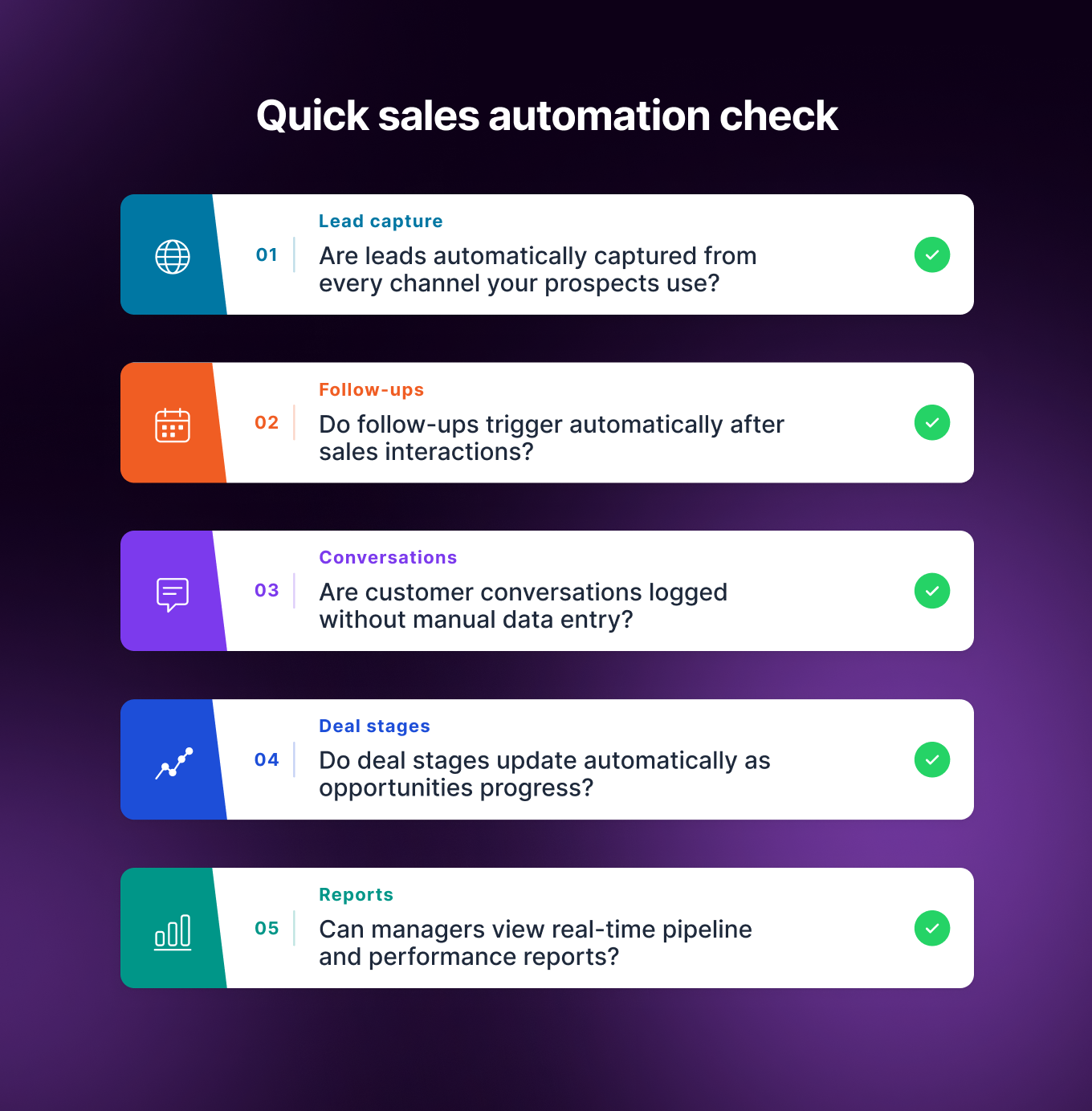
If the answer to several of these questions is no, your sales team may still be relying heavily on manual processes that slow down execution and limit visibility.
Final thoughts
As sales teams grow, the challenge is now managing an increasing volume of conversations and opportunities without letting details slip through the cracks.
Manual processes may work in the early stages. But as pipelines expand, relying on spreadsheets, reminders, and manual CRM updates becomes difficult to sustain.
This is why many organisations are turning to AI WhatsApp CRM platforms to manage sales operations. By automating lead capture, follow-ups, activity tracking, pipeline updates, and reporting, modern systems replace fragmented workflows with a structured, dependable process.
If you want to see how automation can simplify your sales process and improve outcomes, explore what Pepper Cloud AI CRM can do for your team. Get in touch with us to know more.
Frequently asked questions
What is CRM sales automation?
CRM sales automation refers to using software to automatically manage repetitive sales activities such as capturing leads, scheduling follow-ups, logging customer interactions, updating pipeline stages, and generating performance reports. By reducing manual work, sales teams can focus more on engaging prospects and closing deals.
What sales tasks should businesses automate first?
Most organisations start by automating tasks that slow down response time or create administrative overhead. These typically include:
- lead capture and assignment
- follow-up reminders
- activity logging for calls and emails
- deal stage updates in the pipeline
- reporting and performance dashboards
Automating these tasks helps ensure that opportunities move through the sales process without delays.
How does CRM automation improve sales performance?
CRM automation improves sales performance by reducing manual administrative work and ensuring consistent engagement with prospects. Automated workflows help sales teams respond faster, maintain regular follow-ups, and keep the sales pipeline accurate, all of which contribute to higher conversion rates.
Can CRM automation work with messaging platforms like WhatsApp?
Yes. Many modern CRM platforms integrate directly with messaging channels. With tools such as WhatsApp CRM automation, businesses can automatically capture enquiries, track conversations, assign leads to sales representatives, and trigger follow-ups within the CRM system.


