


Telegram personal in-house integration: A user guide
This guide explains how to connect Telegram Personal directly inside your CRM using secure phone verification and OTP authentication. Learn the setup steps, benefits of in-house integration, troubleshooting tips, and how to manage Telegram conversations seamlessly without third-party tools.

Connecting Telegram Personal to your CRM is now faster, simpler, and fully native..
Previously, Telegram integration required Wazzup and manual API configuration. This created onboarding friction and added an external dependency. With our new in-house Telegram personal integration, you can now connect your account directly inside the CRM using secure phone number verification and OTP authentication.
This guide walks you through what has changed, how to set it up, and what to expect during configuration.
What is in-house Telegram personal integration?
The in-house Telegram personal integration eliminates the need for external tools. Instead of retrieving API keys or configuring third-party connectors, you can now:
- Enter your Telegram-linked phone number
- Verify it using a secure 6-digit OTP
- Configure your channel inside the CRM
- Start managing conversations immediately
The entire flow is built into the CRM interface, ensuring a smoother and more controlled setup experience.
 Pepper Cloud Marketing
Why Telegram personal integration matters for your team?
The in-house Telegram integration delivers practical benefits for sales, support, and operations teams:
- Faster onboarding: No more switching between platforms or copying API credentials. Everything happens in one guided flow.
- Improved security: Phone number verification with OTP ensures only authorised users can connect to Telegram accounts.
- Reduced dependency: Removing third-party connectors means fewer points of failure and better reliability.
- Clear validation and error handling: Built-in checks prevent incorrect entries, duplicate connections, and invalid configurations.
How to connect Telegram personal to your CRM
The setup follows a simple four-phase process: phone verification, OTP validation, channel configuration, and confirmation.
Step 1: Configure channel details
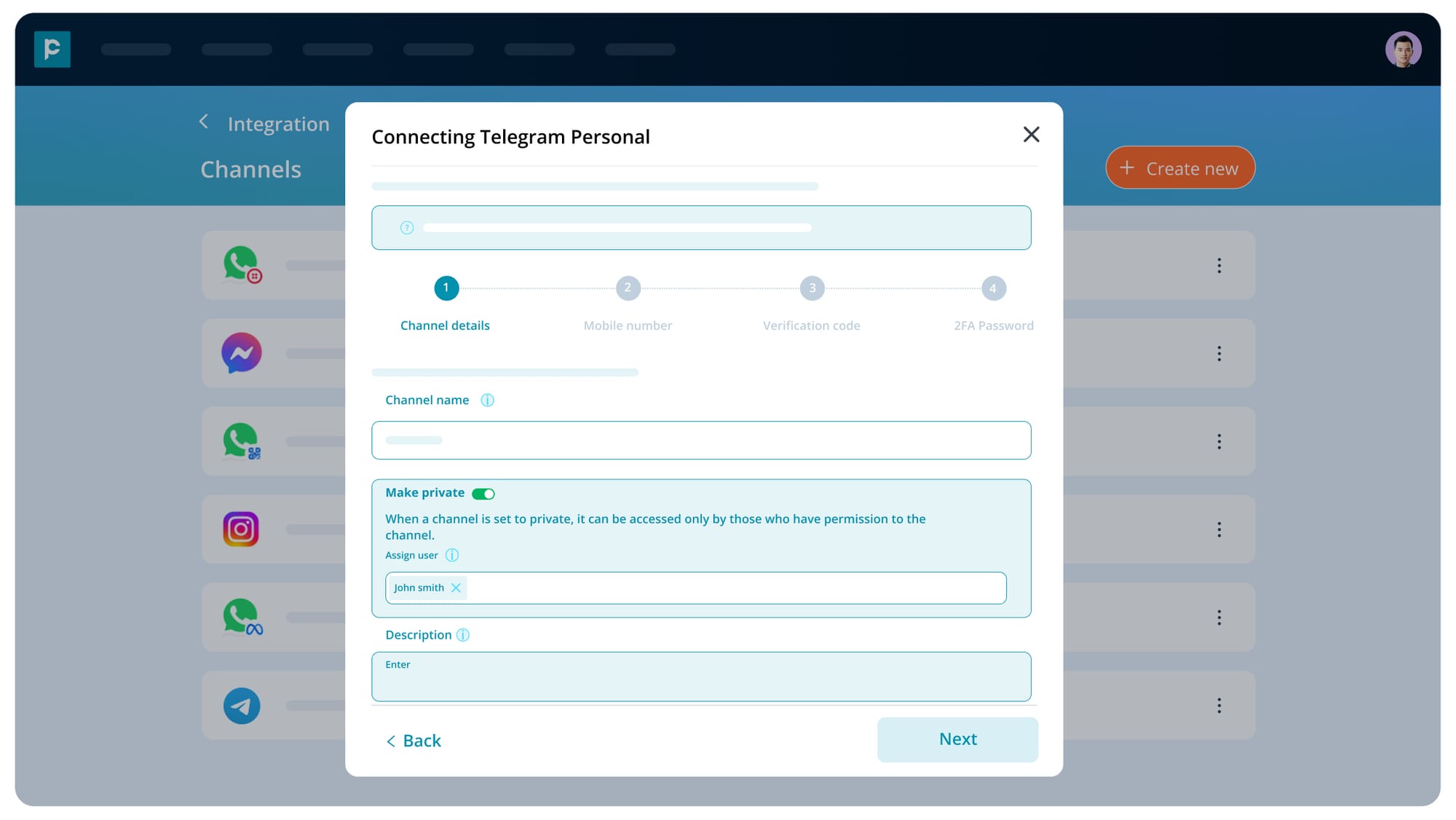
- Go to admin settings > Integration > Telegram personal
- Enter channel name and description.
- Choose to make the channel private or keep it public. If you make the channel private, assign the users to the channel
Step 02: Mobile number verification
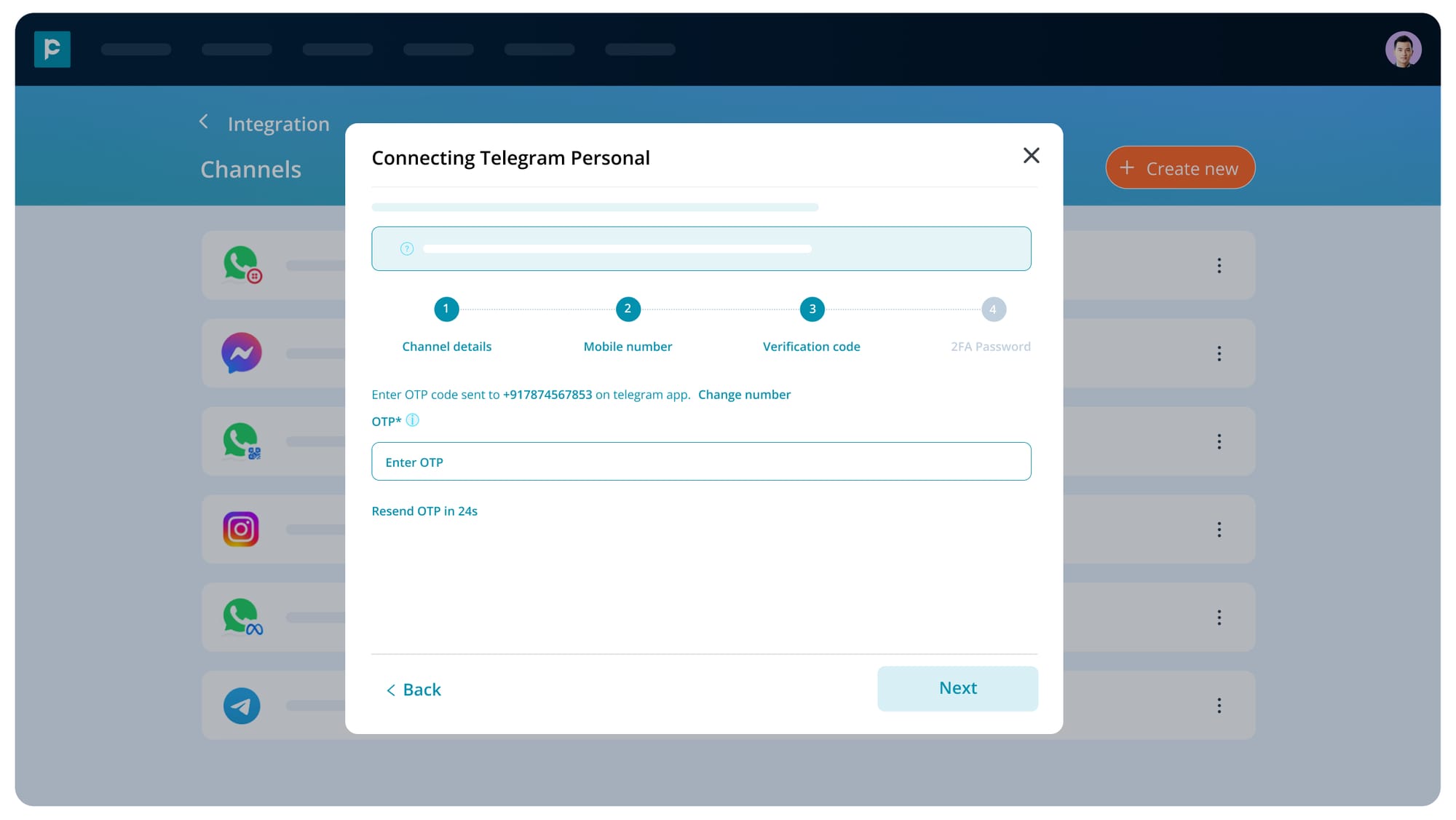
- Add your Telegram phone number.
- You will receive an OTP on your Telegram account. Enter the OTP.
- If 2FA is activated on your Telegram account (on the mobile app), you need to enter the 2FA password.
Frequently asked questions - Telegram personal
1. Can I connect multiple Telegram personal accounts?
Yes. You can connect multiple Telegram Personal accounts to the CRM.
2. Can I connect the same phone number more than once?
No. Duplicate connections are not allowed.
3. What happens if I close the modal during setup?
If you close the modal during OTP verification, the session will reset, and you will need to restart the process.
4. What happens if I navigate away mid-setup?
Your draft state is saved for up to 30 minutes.
5. Will message permissions change?
No. Channel and message permissions continue to work as per existing CRM behaviour.
6. How to activate Two Factor Authentication on Telegram account?
Go to your Telegram account. Click on the settings icon. Navigate to Privacy and Security. Enable Two-Step Verification.
Troubleshooting tips
If you encounter issues during setup:
- Double-check phone number format.
- Ensure your Telegram account is active.
- If too many wrong attempts are made while entering OTP, wait for 15 minutes to cool down before resending.
- Avoid exceeding retry limits (Maximum 3).
- Confirm your internet connection is stable.
If problems persist, contact support with your phone number, timestamp, and a screenshot of the error message.
Conclusion
The new Telegram Personal in-house integration simplifies CRM communication by replacing third-party configuration with secure, native verification. With guided setup, built-in validation, and structured error handling, connecting your Telegram account is now a straightforward process.
You can now manage Telegram conversations directly inside your CRM with greater control, reliability, and ease.
Start connecting your Telegram Personal account today and streamline your customer engagement.


