


What is an MCP server? How it works with AI tools
Learn what an MCP server is, how it connects AI applications with external tools and business systems, and how MCP tools, resources, and prompts work. Explore real-world examples, business use cases, and how MCP enables AI-powered workflows.

An MCP server is a software component that connects AI applications to external tools, data, and services through the Model Context Protocol (MCP). It gives AI applications a standard way to discover available capabilities and use them when a task requires information or actions outside the AI model.
For example, an AI assistant may understand a request such as “find all unresolved support tickets from this week,” but the model cannot answer accurately without access to the company's support system. An MCP server can provide the connection that allows the AI application to retrieve the required information from an authorised source.
MCP has become increasingly important as AI applications move beyond generating text and start working with external systems. In July 2026, the official MCP project reported nearly 500 million downloads per month across its Tier 1 SDKs, while both its TypeScript and Python SDKs had surpassed 1 billion total downloads.
So, what is an MCP server, how does it work, and why is it becoming relevant to businesses building AI-powered workflows? The answer starts with understanding the protocol behind it.
What is the Model Context Protocol?
The Model Context Protocol is an open standard that defines how AI applications can connect to external data sources and tools.
Without a common protocol, developers may need to create individual integrations between an AI application and each service it needs to access. As the number of AI applications and business systems increases, maintaining these separate connections can become complex.
MCP provides a common framework for these interactions.
An AI application can connect to an MCP server, discover what the server makes available, and use those capabilities when required. MCP servers can expose tools, resources, and prompts, giving AI applications different ways to access information and functionality.
The important distinction is that MCP does not make an AI model more knowledgeable by itself. Instead, it gives the application a standardised way to connect the model to information and capabilities that exist outside it.
What is an MCP server responsible for?
An MCP server acts as the connection point between an AI application and an external system.
The external system could be:
- A CRM
- A database
- A business API
- A file repository
- A knowledge base
- A support platform
- A project management system
- An analytics application
The server determines what the AI application can access and which operations it can request.
For example, a company could build an MCP server around its support platform and expose selected capabilities such as searching tickets, retrieving ticket details, or checking SLA information.
The AI application does not need direct, unrestricted access to the entire support database. Instead, the MCP server provides defined capabilities that can be controlled and secured.
This creates a useful separation:
AI application, MCP server, external system
The AI handles understanding and reasoning. The MCP server handles access to the capabilities made available by the connected system.
How does an MCP server work with an AI tool?
An MCP server works as a standardised connection between an AI application and the external systems, data, or tools it needs to complete a task. Instead of relying only on information available within the AI model, the application can use an MCP server to access authorised capabilities from connected systems.
The process typically involves the AI application, MCP client, MCP server, and the external system working together.
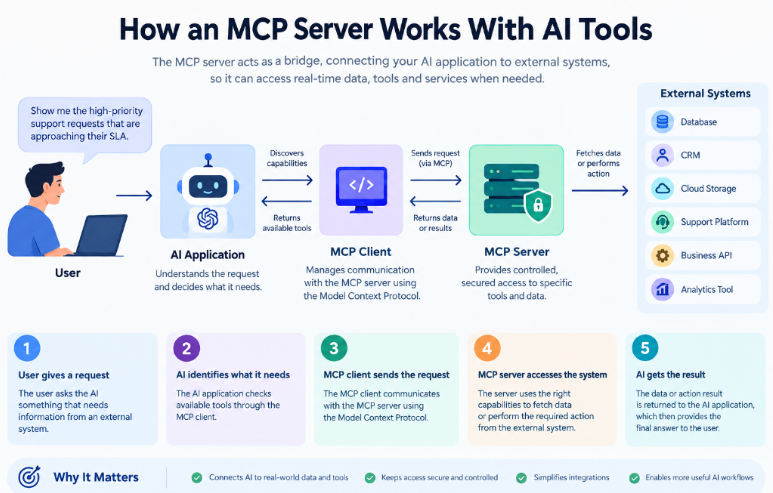
Here is how the process works:
1. The user gives the AI a request
The process starts when a user gives an instruction to an AI application. For example:
“Show me the high-priority support requests that are approaching their SLA.”
The AI needs information from a support platform to answer this accurately. That information may not be available in the model itself.
2. The AI application identifies what it needs
The AI application determines that it needs external information to complete the request. An MCP client within the host application manages communication with the relevant MCP server.
The application can discover the capabilities available through the server, including the MCP tools it can use. These tools can be designed for specific operations, such as searching records, retrieving information, or performing an authorised action.
3. The MCP client sends the request to the MCP server
The MCP client communicates with the appropriate MCP server using the Model Context Protocol. The MCP server receives the request and determines how to access the required capability.
For example, an MCP server connected to a support platform could expose a tool for searching support tickets based on priority, status, or SLA.
4. The MCP server accesses the required system
The MCP server connects to the underlying data source or business system that provides the requested information. Depending on its implementation, this could be a database, API, file repository, knowledge base, or business application.
The server acts as the controlled interface between the AI application and that external system. MCP servers can expose tools, resources, and prompts, allowing AI applications to access information or perform supported operations through a standardised interface.
5. The external system returns the result
The connected system processes the request and sends the relevant information back through the MCP server.
For example, the support platform might return a list of high-priority tickets that are close to their SLA deadline.
6. The AI uses the result to generate a response
The MCP server returns the result to the AI application through the MCP client. The AI can then use that information as context and provide a response based on the retrieved data.
For example, instead of guessing which tickets are approaching their SLA, the AI can present the actual support requests returned by the authorised system.
A simple example
Consider a support team using an AI assistant to monitor incoming requests.
A manager asks:
“Which unresolved support requests have been waiting for more than 24 hours?”
The workflow can look like this:
User request, AI application, MCP client, MCP server, Support system, MCP server, MCP client, AI response
The MCP server may provide an MCP tool that searches the support system for unresolved requests and applies the required criteria. The returned information is then passed back to the AI application, which can summarise the results for the manager.
This is what makes an MCP server useful for AI-powered workflows. The AI model handles the understanding and reasoning, while the MCP server provides a structured way to access the external capabilities required to complete the task.
Importantly, an MCP server does not automatically give an AI access to every system or piece of business data. Access depends on the tools, resources, permissions, and security controls implemented by the application and server.
How does MCP actually work with a real AI tool?
MCP is easier to understand when you see what an AI-to-business-system workflow looks like in practice. A similar real-world example is Pepper Cloud AssistAI with ChatGPT, where users can connect their Pepper Cloud CRM and ask ChatGPT to retrieve CRM information or perform supported CRM actions.
Step 1: Connect Pepper Cloud to ChatGPT
Before connecting your CRM, you first need to find Pepper Cloud AssistAI in ChatGPT.
Open ChatGPT and start a chat. Click the + (tools) icon next to the message box. From there, look for Pepper Cloud AssistAI. You can also find it through Settings Apps & Connectors.
Another option is to simply ask ChatGPT:
“Connect to Pepper Cloud AssistAI.”
ChatGPT may also suggest AssistAI automatically when it detects that your request requires CRM data.
Step 2: Add AssistAI and connect your CRM
Select Pepper Cloud AssistAI and click Add or Install. Review the access requested by the app and confirm the connection.
ChatGPT then redirects you to the Pepper Cloud CRM login page. Sign in using the same credentials you normally use to access Pepper Cloud CRM and approve the requested permissions.
After authorisation, you are redirected back to ChatGPT, where Pepper Cloud AssistAI is connected.
The connection uses OAuth 2.0, so your Pepper Cloud CRM password is not shared with or stored by ChatGPT. AssistAI also follows the permissions of your existing CRM account, meaning it can only access the records and actions available to that user.
Step 3: Use AssistAI in a ChatGPT conversation
Once AssistAI is connected, enable it for the conversation from the Tools + menu if it is not already enabled.
You can then ask questions about your CRM using normal language. For example:
“Show me how many open deals I have.”
ChatGPT calls Pepper Cloud AssistAI when the request requires CRM data, and the relevant information is returned directly in the chat.
Step 4: Ask ChatGPT to perform a CRM action
The workflow can also support actions, not just information retrieval.
For example, you could ask:
“Create a follow-up activity for the Acme deal for next Tuesday.”
AssistAI can create or update supported CRM records and activities. However, ChatGPT does not make the change silently. It shows the proposed action and asks for your confirmation before writing the change to the CRM. AssistAI also does not support deleting CRM records.
The three main capabilities an MCP server can expose
MCP servers can provide different types of capabilities. Understanding these makes the architecture easier to follow.
1. Tools
MCP tools are functions that an AI application can call to perform a specific operation.
A support-focused server might expose tools such as:
- Search support tickets
- Retrieve ticket details
- Check SLA status
- Find unresolved requests
- Assign a ticket
- Update ticket information
A tool normally has defined inputs and outputs, allowing the AI application to interact with it in a structured way.
2. Resources
Resources provide information that an AI application can access.
They can represent data such as documents, files, database content, or other sources of contextual information.
For example, an MCP server could expose a company's internal support documentation as resources that an AI application can use while answering a question.
3. Prompts
Prompts are reusable templates that can guide how an AI application interacts with an MCP server or performs a particular task.
Together, these capabilities allow MCP servers to provide more than simple data retrieval.
How can businesses use MCP servers?
The value of an MCP server depends on what the organisation connects to it.
1. Connecting AI to business data
Businesses can expose approved information from internal systems so AI applications can work with company-specific data.
For example, an AI assistant could retrieve information from an internal knowledge base instead of relying only on general model knowledge.
2. Supporting AI-powered customer support
AI applications can potentially use MCP tools to interact with authorised support information.
For example, an AI workflow could retrieve support requests, check ticket status, search approved knowledge resources, or access SLA information.
This direction is particularly relevant to platforms such as Pepper Cloud, where AI-powered support workflows depend on connecting support operations with the information teams need to resolve requests efficiently.
However, MCP should be viewed as an integration architecture rather than a replacement for a support platform itself.
3. Automating repetitive workflows
An AI agent may need several capabilities to complete one task.
For example, it could:
- Search for a support request.
- Retrieve its details.
- Check relevant information.
- Determine the next permitted action.
- Trigger an authorised operation.
MCP can provide a structured way for the AI application to access those capabilities.
4. Connecting AI to development environments
Developers can also use MCP servers to expose files, repositories, documentation, databases, testing systems, and other development resources to AI coding applications.
This allows AI tools to work with the actual development environment rather than relying solely on information supplied in a prompt.
Why does MCP matter for AI-powered business workflows?
AI becomes more useful to a business when it can work with the systems and information that employees already use. A language model can generate an answer from its existing knowledge, but many business tasks require access to current data, internal resources, or specific tools.
This is where an MCP server becomes important.
The Model Context Protocol provides a standard way for AI applications to connect with external data and capabilities. MCP servers can expose tools, resources, and prompts, allowing an AI application to retrieve relevant information or perform supported actions through a structured interface.
1. MCP connects AI reasoning with business systems
Consider a support team that wants to use AI to monitor support requests. An AI assistant may understand that a manager wants to find unresolved high-priority requests, but it needs access to the support system to retrieve the actual records.
An MCP server can provide that connection.
For example, an MCP server could expose an MCP tool for searching support requests. The AI application can use that tool to retrieve relevant information from an authorised system and then use the returned data to prepare a response.
This separation is important because the AI model does not need to contain or directly manage every business integration. The MCP server provides a defined interface to the specific capabilities the application is allowed to use.
2. MCP helps AI work with current business information
Many business decisions depend on information that changes frequently. Support tickets, project records, inventory, account information, internal documents, and operational data can change after an AI model has been trained.
An MCP server can give an AI application access to authorised external information when it needs it. MCP resources are designed to provide contextual data to AI applications, while tools can allow models to retrieve information or perform actions.
This means an AI workflow can be designed around the information available in the connected business systems instead of relying only on the model's built-in knowledge.
3. MCP supports more than simple information retrieval
The value of Model Context Protocol servers is not limited to reading data.
Depending on how a server is implemented and what permissions are provided, MCP tools can support operations such as:
- Searching support requests
- Retrieving ticket details
- Accessing approved knowledge resources
- Querying databases
- Working with files and documents
- Calling authorised APIs
- Triggering specific business actions
For example, an AI assistant could retrieve a support request, check relevant information from an approved knowledge base, and then use an authorised tool to perform a permitted workflow action.
The exact capabilities depend on the MCP server and the tools it exposes. MCP itself provides the standardised interface; it does not automatically grant an AI access to every business system.
4. MCP can make AI workflows easier to build and extend
Without a common protocol, developers may need to create and maintain different integration approaches between AI applications and external systems. MCP is designed to provide a common interface for these connections.
This can make an AI architecture more modular. An application can connect to different MCP servers that provide specialised capabilities, while each server focuses on a defined set of resources or tools. The official MCP architecture describes servers as focused components that can be composed together while maintaining security boundaries.
For businesses, this matters when AI workflows expand from a single use case into several areas such as support, development, internal knowledge management, reporting, or operations.
5. MCP creates a foundation for agentic workflows
AI systems are increasingly being designed to do more than generate text. They can be given access to information and tools that allow them to complete multi-step tasks.
MCP is relevant to these workflows because it provides a structured way for AI applications to discover and use external capabilities. The official MCP documentation specifically describes the protocol as a foundation for building agents and complex workflows on top of language models.
For example, a support workflow could involve:
Find a support request, retrieve its details, check relevant information, identify the next permitted action, use an authorised MCP tool, and return the result
The AI handles the reasoning involved in the workflow, while the connected systems provide the actual business data and capabilities.
Conclusion
So, what is an MCP server? It is a software component that allows an AI application to interact with external tools, data, and services through the Model Context Protocol. The server can expose MCP tools, resources, and prompts, while the underlying systems continue to handle their own data and business logic.
The result is a clear separation between the AI application and the systems it needs to work with:
AI application, MCP server, external tools and data
As AI moves from answering questions to completing real tasks, this type of connectivity becomes increasingly important. MCP gives developers a common framework for building those connections while allowing organisations to control which data and actions are available.
For businesses evaluating AI-powered workflows, understanding what is MCP server is, therefore, is not just about learning another AI technology. It is about understanding how AI applications can securely connect with the systems that already run the business.
FAQs
1. What is an MCP server?
An MCP server is a software component that connects AI applications with external tools, data, and services through the Model Context Protocol.
2. What is MCP server used for?
An MCP server is used to give compatible AI applications access to specific tools and information from systems such as APIs, databases, files, knowledge bases, and business applications.
3. What are MCP tools?
MCP tools are defined functions that an AI application can call through an MCP server. They can be used to retrieve information or perform authorised operations.
4. Is MCP a replacement for APIs?
No. MCP and APIs serve different purposes. An MCP server can use existing APIs to connect an AI application with an underlying business system.
5. Are MCP servers secure?
MCP does not automatically make an integration secure. Businesses need to implement appropriate authentication, authorisation, permissions, validation, monitoring, and data-protection controls.
6. Why are MCP servers important for AI?
MCP servers give AI applications a standardised way to access external tools and information. This is particularly useful for AI agents that need to work with multiple systems to complete a task.
7. What is the difference between an MCP server and an MCP client?
The MCP server provides tools, resources, or other capabilities, while the MCP client establishes the connection and allows an AI application to interact with those capabilities.